AR Raiders launched with a great critical reception from players and critics alike, and has seen steady player engagement since then. However, the game isn’t free of technical issues, as PC users are experiencing Unhandled Exception crashes and D3D11 Compatible GPU Required error at startup. Aside from these, ARC Raiders players are also experiencing a common Unreal Engine 5 error, that being the “Out of Video Memory” crash. I have compiled a list of fixes that will resolve the Out of Video Memory crashes in ARC Raiders on your Windows PC.
Working Fixes for ARC Raiders LowLevelFatalError Crash
PC users report that ARC Raiders keeps crashing and displays the following error messages:
LowLevelFatalError [File:.\Runtime/D3D12RHI/Private/D3D12Util.cpp] [Line: 1046]
Out of video memory trying to allocate a rendering resource
0x00007ff717f8c06c PioneerGame.exe!UnknownFunction []
0x00007ff717fa0756 PioneerGame.exe!UnknownFunction []
0x00007ff717f942e9 PioneerGame.exe!UnknownFunction []
0x00007ff717f45fc8 PioneerGame.exe!UnknownFunction []
0x00007ff717f4df92 PioneerGame.exe!UnknownFunction []
0x00007ff717f749a0 PioneerGame.exe!UnknownFunction []
0x00007ff718098381 PioneerGame.exe!UnknownFunction []
0x00007ff71808c07c PioneerGame.exe!UnknownFunction []
0x00007ff715e622de PioneerGame.exe!UnknownFunction []
0x00007ff715e7dd3d PioneerGame.exe!UnknownFunction []
0x00007ff71601b245 PioneerGame.exe!UnknownFunction []
0x00007ff71600f676 PioneerGame.exe!UnknownFunction []
0x00007ffc3ecfe8d7 KERNEL32.DLL!UnknownFunction []
0x00007ff715de0381 PioneerGame.exe!UnknownFunction []
Crash in runnable thread PSOPrecompilePool #7
OR
Out of video memory trying to allocate a rendering resource. Make sure your video card has the minimum required memory, try lowering the resolution and/or close other applications that are running.
There are multiple reasons for the “LowLevelFatalError Out of Video Memory ” crash in ARC Raiders, like the game not using discrete graphics hardware, an overclocked graphics card, and more. The following fixes will resolve the Out of Video Memory crashes on your Windows PC.
Fix #1 – Force ARC Raiders to Run on Dedicated Graphics Hardware (Laptop only)
If you are playing ARC Raiders on a gaming laptop, the integrated GPU (iGPU) is the reason the game is crashing with the “Out of Video Memory” error.
Gaming laptops utilize both the iGPU and the discrete NVIDIA or AMD graphcis card by default, and Windows switches between the two depending on rendering load. You are experiencing the “Out of Video Memory” crashes in ARC Raiders due to Windows not switching to the dedicated graphics card. You can fix the error by forcing ARC Raiders to always use the dedicated graphics hardware.
Here is how you can force ARC Raiders to run on the dedicated graphics card to fix the Out of Video Memory crash on your PC:
- Open Windows settings, go to System, select Display, and go to Graphics.
- Look for “ARC Raiders” in the list of apps and programs and select it.
- Click on “Options” and check the “High Performance” option. Save the changes.
- Play the game and the LowLevelFatalError crash is fixed.


Fix #2 – Enable CUDA – Sysmem Fallback Policy for ARC Raiders
As I stated, the “Out of Video Memory” error is a commonly occurring error in PC games that use Unreal Engine 5, which include The Outer Worlds 2, inZOI, Avowed, Tintan Quest 2, and more. This error is so prevalent in Unreal Engine games that NVIDIA added the “CUDA – Sysmem Fallback Policy” setting in the NVIDIA Control Panel to fix it.
To fix the Out of Video Memory crashes in ARC Raiders, enable the CUDA – Sysmem Fallback Policy setting in the NVIDIA Control Panel. This setting is not available in the NVIDIA App, at the time of writing.
Here is how you can enable the CUDA – Sysmem Fallback Policy setting and fix the Out of Video Memory crashes on your PC:
- Open the NVIDIA Control Panel and click the “Manage 3D Settings” option from the left menu.
- Go to the “Program settings” tab.
- Select “ARC Raiders” from the drop-down menu.
- Scroll down to the “CUDA – Sysmem Fallback Policy” setting, select the “Prefer Sysmem Fallback” option, and apply the changes.
- Play Arc Raiders and the LowLevelFatalError crash is fixed.

Fix #3 – Clear ARC Raiders’ Shader Cache and Increase Its Size
Unreal Engine isn’t the only game engine that uses shaders for its visuals and performance, but it has become synonymous with it. Almost every Unreal Engine game compiles shaders in a cache when it is first launched on PC.
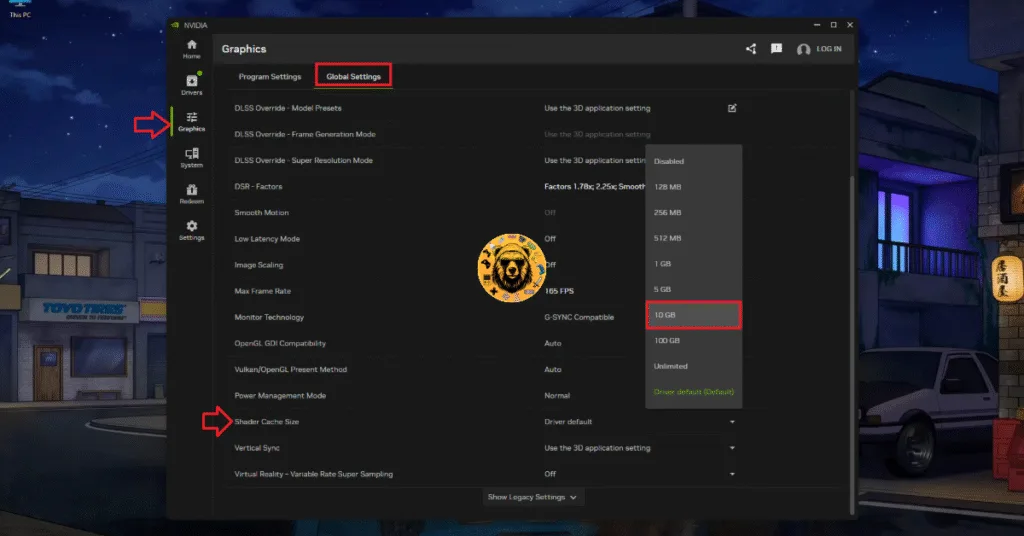
Since ARC Raiders uses Unreal Engine 5, it also relies on shaders for its visuals and performance. The reason ARC Raiders is crashing with the “Out of Video Memory” error is due to a corrupt or small shader cache. You can fix these Video Memory crashes by clearing the shader cache, increasing its size, and recompiling ARC Raiders’ shaders. Here is how you can apply the fix:
- Open the NVIDIA App and go to the “Graphics” tab.
- Go to the “Global Settings” tab.
- Scroll down to the “Shader Cache Size” setting and select the “Disable” option.
- Restart your PC, go back to the “Shader Cache Size” setting, and select 10 GB or a higher value.
- Launch ARC Raiders, and the game will compile shaders.
- Continue playing and the Out of Video Memory crashes are now fixed.
Fix #4 – Ensure Your Graphics Card is Using Stock Clocks
If you have overclocked your graphics card, it is the reason ARC Raiders is crashing on your PC and displays the “Out Of Video Memory” error. Some game engines are sensitive to GPU clocks, and Unreal Engine is one of them, which is why overclocking is crashing ARC Raiders. Revert your graphics card to its default GPU and Memory clocks to fix the LowLevelFatalError Out of Video Memory crashes on your PC.
Fix #5 – Update BIOS or Reduce Performance Core Ratio (Intel Raptor Lake)
Unreal Engine 5 games don’t run well on Intel 13th and 14th-generation CPUs due to the overvoltage issue. Even Oodle has confirmed that these CPUs cause Out of Video Memory crashes in Unreal Engine games.
Intel has acknowledged the issue and rolled out a BIOS update to fix it. If you are playing ARC Raiders on a PC with an Intel 13th or 14th-generation CPU, the processor is the reason for the Out of Video Memory crashes on your PC. You can fix the ARC Raiders Out of Video Memory crashes by updating the BIOS.
If updating the BIOS didn’t fix the error, then it’s likely that the damage to your processor is permanent. In this case, you can fix the Out if Video Memory crashes by reducing the Performance Core Ratio of your Intel CPU. This fix has worked for many Unreal Engine 5 games experiencing the LowLevelFatalError crashes, including Mafia: The Old Country and Borderlands 4.
Here is how you can reduce the Performance Core Ratio of your Intel CPU to fix the Out of Video Memory crashes in ARC Raiders on your PC:
- Download and install Intel Extreme Tuning Utility.
- Open the application and set the Performance Core ratio to 50x.
- Play ARC Raiders, and the LowLevelFatalError crash is now fixed.
That is all for our ARC Raiders fixes for the Out of Video Memory error on your Windows PC. If you are experiencing errors and crashes in games, also see our fixes hub for commonly occurring errors for PC.