Cairn, a game running on the Unity 6 engine, is a rock-climbing simulation adventure developed by The Game Backers. The game received positive reviews from players and critics alike. However, Linux players are experiencing an issue with the game; the PlayStation DualSense controller doesn’t seem to rumble while playing Cairn. This can be easily resolved, and here is how you can enable PlayStation DualSense rumble in Cairn on your Linux PC.
Working Fix for DualSense HD Rumble in Cairn on Linux
What happens is that sometimes Linux’s audio pipeline gets misconfigured, which results in no rumble at all. This makes your Cairn experience less fun. Here’s what you can do to force PipeWire/WirePlumber to treat the DualSense exactly the way HD Rumble expects. PC users report that this fix makes the DualSense Rumble work in Carin on Linux.
- First step is to create this directory structure: ~/.config/wireplumber/wireplumber.conf.d/
- Inside the last directory, create a file: 90-dualsense.conf.
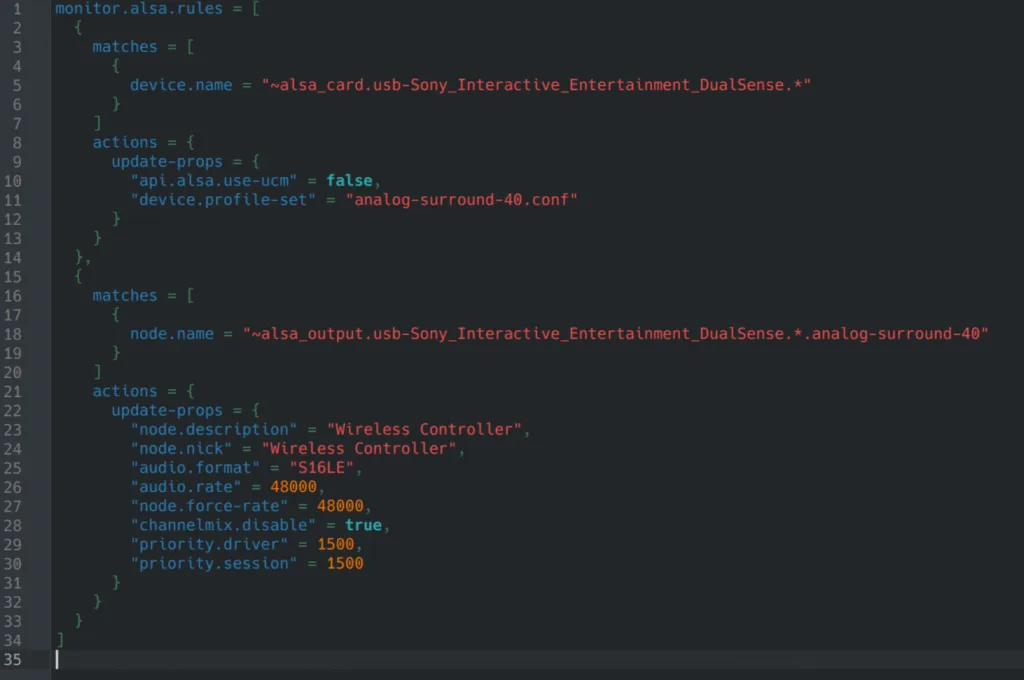
- Open your text editor and paste the following:
monitor.alsa.rules = [
{
matches = [
{
device.name = “~alsa_card.usb-Sony_Interactive_Entertainment_DualSense.*”
}
]
actions = {
update-props = {
“api.alsa.use-ucm” = false,
“device.profile-set” = “analog-surround-40.conf”
}
}
},
{
matches = [
{
node.name = “~alsa_output.usb-Sony_Interactive_Entertainment_DualSense.*.analog-surround-40”
}
]
actions = {
update-props = {
“node.description” = “Wireless Controller”,
“node.nick” = “Wireless Controller”,
“audio.format” = “S16LE”,
“audio.rate” = 48000,
“node.force-rate” = 48000,
“channelmix.disable” = true,
“priority.driver” = 1500,
“priority.session” = 1500
}
}
}]
Here’s what the final result should look like:
- Save the file and activate this rule with:
systemctl –user restart wireplumber pipewire pipewire-pulse
- Reconnect your DualSense to your PC USB port and restart the game.
- Continue playing Cairn, and the DulaSense rumble will work.
And that’s how you fix PlayStation Dual Sense Linux HD Rumble in Cairn on Linux. I hope that this guide helped you. If you are experiencing other issues and errors in Cairn, then check our other Fixes for Cairn that will resolve them.