
CODE VEIN II is another Unreal Engine 5 (UE5) game experiencing the Out of Video Memory error on PC. Almost every UE5 game released in 2025, including Avowed, ARC Raiders, The Outer Worlds 2, and InZoi, exhibited the same issue. This particular error occurs due to the Intel 13th and 14th Gen CPUs, most of the time. To fix the Out of Video Memory crash in CODE VEIN 2, I have compiled fixes here.
5 Ways to Fix CODE VEIN II Out of Video Memory Error on PC
PC users report that CODE VEIN 2 keeps crashing to the desktop at startup or during gameplay, and displays the Out of Video Memory error message. There are multiple reasons why you are experiencing this error message, chief among them being the Intel 13th and 14th Gen CPU, along with a small shader cache size, and the game not using dedicated graphics hardware. The following fixes will resolve the Out of Video Memory crashes in CODE VEIN 2 on your Windows PC.
Fix #1 – Check Your CPU
The Out of Video Memory crash is a common occurrence in Unreal Engine 5 games running on PCs with Intel 13th and 14th-generation CPUs. This is because the CPUs have an overvoltage issue, which Intel resolved with BIOS updates.
Even Oodle has confirmed that Intel 13th and 14th-generation CPUs are the reason for various UE5 errors, including the Out of Video Memory and UE Fatal Error crashes. To fix the error in CODE VEIN 2, update your motherboard BIOS. However, for some players, this fix might not be enough if the processor has permanent damage. In that case, you’ll have to reduce the Performance Core Ratio of the CPU.
Reduce Performance Core Ratio
- Download and install Intel Extreme Tuning Utility.
- Open the application and set the Performance Core ratio to 53x (If 53x doesn’t fix the crash, reduce it to 50x).
- Play CODE VEIN II and the Out of Video Memory crash is now fixed.
Alternatively, you can use Windows Power Efficiency mode, if yoy don’t want to mess with CPU Core clocks.
- Open Windows settings, select System, and go to Power.
- Select “Best Power Efficiency” for Power Mode.
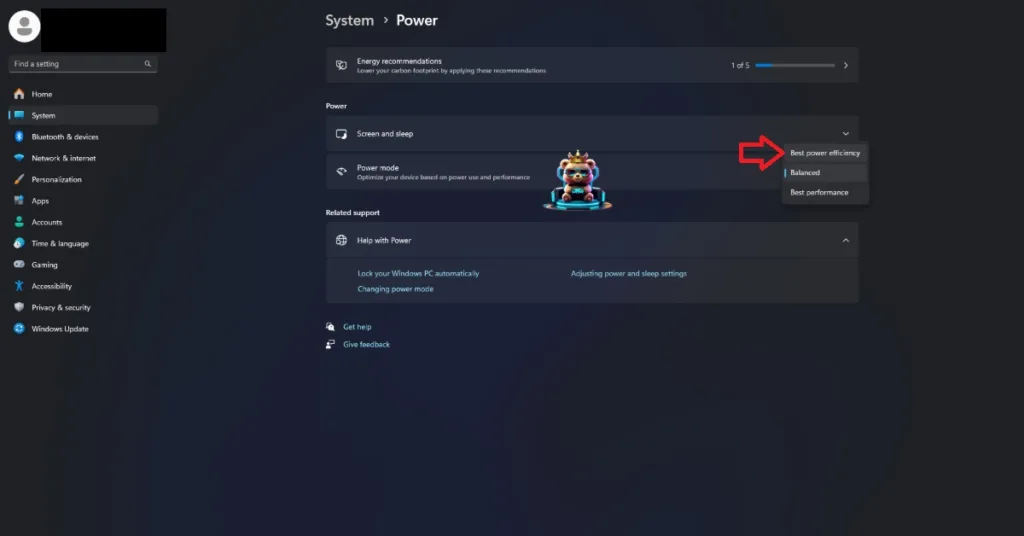
If The CODE VEIN II is crashing during shader compilation and displays the Out of Video Memory message, reduce the Performance Core Ratio, run the game, and let the shaders compile. After the shaders are compiled, close the game, revert the Performance Core Ratio to its default value. Only underclock the Power Core Ratio again if the game is crashing during gameplay.
Fix #2 – Rebuild CODE VEIN II Shaders and Increase Cache Size (NVIDIA)
Most game engines create a shader cache to quickly access shaders when required by the game. This helps with the game’s performance and visual fidelity. However, Unreal Engine 5 is most synonymous with the use of shaders, thanks to its shader compilation stutters on PC.
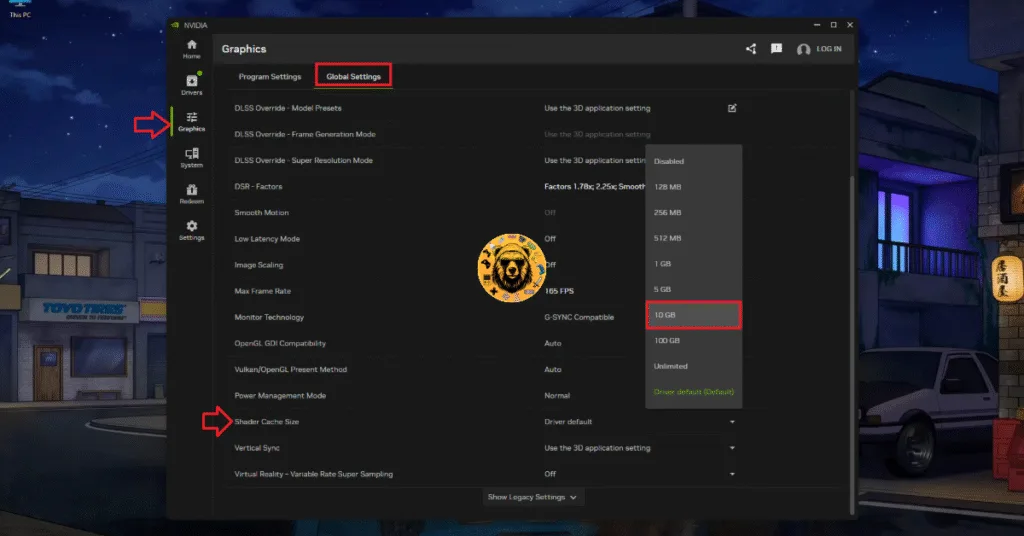
The reason CODE VEIN 2 is crashing on your PC with the Out of Video Memory error is that the shader cache size for the game is small. You can fix these crashes by clearing the shader cache, increasing its size, and recompiling CODE VEIN II’s shaders. Here is how you can apply the fix:
- Open the NVIDIA App and go to the “Graphics” tab.
- Go to the “Global Settings” tab.
- Scroll down to the “Shader Cache Size” setting.
- Select the “Disable” option.
- Restart your PC.
- Go back to the “Shader Cache Size” setting and select 10GB or a higher value.
- Launch CODE VEIN II and the Out of Video Memory crashes are fixed.
Fix #3 – Ensure CODE VEIN II is Running on Dedicated Graphics Card
If you’re trying to play CODE VEIN 2 on a gaming laptop, and it crashes at startup with the Out of Video Memory error, then the culprit is the integrated GPU (iGPU). Gaming laptops utilize both the iGPU and dedicated NVIDIA or AMD graphics card. The OS switches between the two depending on load.
In the case of CODE VEIN II, the OS isn’t switching to the dedicated graphics card, which is crashing the game with the Video Memory error. You can fix the error by forcing CODE VEIN II to use thededicated graphics hardware in Windows settings.
Here is how you can force CODE VEIN 2 to run on the dedicated graphics card to fix the Out of Video Memory crash on your PC:
- Open Windows settings, go to System, select Display, and go to Graphics.
- Look for “CODE VEIN II” in the list of apps and programs and select it.
- Click on “Options” and check the “High Performance” option. Save the changes.
- Play CODE VEIN 2 and the Out of Video Memory crash is fixed.


Fix #4 – Ensure Your Graphics Card is Using Stock Clocks
Oftentimes, the Out of Video Memory crash occurs not because of the game exceeding available VRAM on the GPU, but because of the clock speeds. Unreal Engine 5 is sensitive to GPU and Memory clocks speeds, and CODE VEIN 2 keeps crashing on your PC with this error due to your overclocked graphics card. To fix the Out of Video Memory error, revert the graphics card to its default GPU and Memory clocks.
In case you haven’t overclocked your graphics card, it is still using high GPU and Memory clocks due to factory overclock. Most graphics cards from NVIDIA and AMD AIB partners feature higher GPU and Memory clocks, and even higher voltage.
These higher clocks are the reason CODE VEIN II is crashing on your PC and displays the Out of Video Memory error. To fix the Out of Video Memory crashes on your PC, you need to force the graphics card to use its reference GPU and Memory clocks. For NVIDIA graphics cards, you can enable the Debug Mode to force the graphics card to use its reference GPU and Memory clocks.
- Open the NVIDIA Control Panel.
- Click the “Help” button from the top menu.
- Select the “Debug Mode” option.
- Play CODE VEIN 2, and the Out of Video Memory crash is fixed.

Fix #5 – Use CUDA – Sysmem Fallback Policy For CODE VEIN II (NVIDIA)
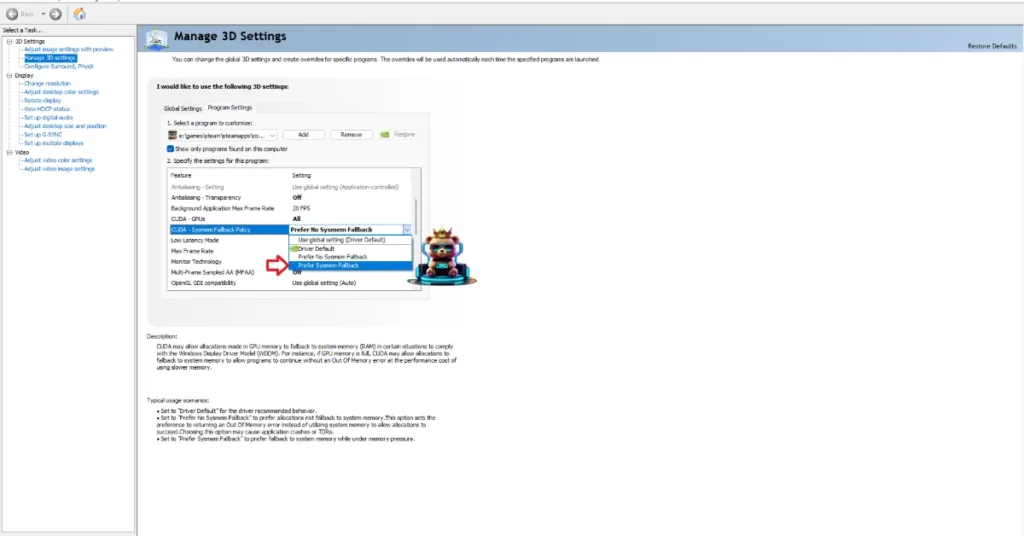
CUDA – Sysmem Fallback Policy is an NVIDIA GPU-specific setting that NVIDIA introduced in its Control Panel to specifically counteract the Out of Video Memory crashes. Enable this setting in the NVIDIA Control Panel to fix the Out of Video Memory crashes in CODE VEIN II.
- Open the NVIDIA Control Panel and click the “Manage 3D Settings” option from the left menu.
- Go to the “Program settings” tab.
- Select “CODE VEIN II” from the drop-down menu.
- Scroll down to the “CUDA – Sysmem Fallback Policy” setting, select the “Prefer Sysmem Fallback” option, and apply the changes.
- Play CODE VEIN 2, and the Out of Video Memory crashes are fixed.
That is all for our CODE VEIN II fixes for the Out of Video Memory crashes on your Windows PC. If you are facing errors and issues while playing other games on PC and handhelds, head to our hub of commonly occurring PC errors and their fixes.