Following EA FC 24 and 25, FC 26 is the third installment in the EA Sports FC franchise. While EA has distanced itself from FIFA branding, its EA Sports FC games still run on the Frostbite engine. After all, it’s their proprietary engine that scales well across various devices. However, players have been experiencing sudden frame drops after halftime, substitutions, replays, or any cutscene in EA Sports FC 26. If you are also experiencing the same low FPS performance issues in EA Sports FC 26, then this guide is all you need.
Low FPS in EA Sports FC 26 Fixed on PC
The reason EA Sports FC 26 experiences sudden frame drops is that the in-game FPS limiter and V-sync are broken. Your GPU suddenly tries to render unlimited FPS, which results in overload, becoming the cause for the frame drops.
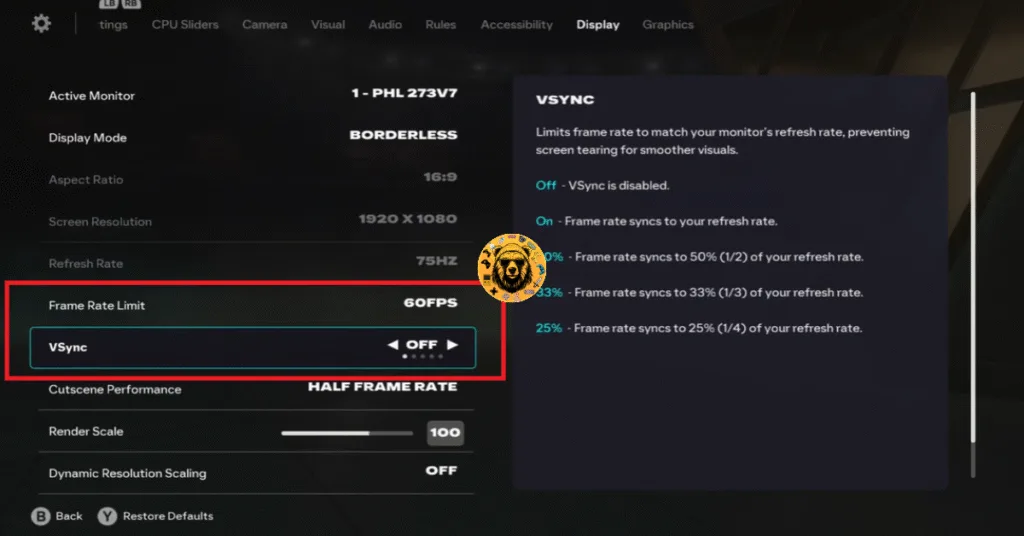
To fix the stutters or the sudden FPS drops in EA Sports FC 26, disable the in-game Vsync and FPS limiter, and use the driver FPS limiters. Here’s how you can apply the fix:
For Nvidia Users:
- Open the Nvidia Control Panel and click on Manage 3D settings.
- Head to Program settings and add EA SPORTS FC 26 (browse to FC26.exe if needed).
- Turn on Max Frame Rate and set it to 60 or 144 FPS, depending on your monitor’s refresh rate (60 is recommended).
- Click Apply and launch EA SPORTS FC 26.
- In the game’s settings, turn both V-sync and FPS Limit to OFF.

For AMD users:
- Open AMD Adrenalin> Gaming> EA SPORTS FC 26.
- Under Graphics, enable Frame Rate Target Control (FRTC) and set it to 60 FPS.
- Set Wait for Vertical Refresh (VSync) to Always off.
- Disable Radeon Chill and save the settings.
- In your game’s settings, turn V-sync and FPS Limit to OFF.
- Launch the game to enjoy a smooth experience.
Now, your GPU controls EA SPORTS FC 26 instead of the game’s broken FPS limiter. After following these steps, EA SPORTS FC 26’s performance on your PC will be fixed, and you won’t experience frame drops. If you are facing errors and issues while playing other games on PC and handhelds, head to our hub of commonly occurring PC errors and their fixes.