

There is no end to the errors and issues in EA Sports FC 26. Running on the Frostbite engine, FC 26 has left many players frustrated due to the numerous crashes and errors. Lately, PC players report that the game is crashing at startup. If you are also experiencing EA Sports FC 26 startup crash on your PC, then this guide is all you need.
EA SPORTS FC 26 Keeps Crashing at Startup Fixes That’ll Help
After digging through some fixes, I found one that has helped several EA Sports FC 26 players and will definitely help you resolve the game not launching on your PC. Just follow my lead, and the EA Sports FC 26 crash at startup issue will be fixed.
Fix #1 – Repair or Install Visual C++ Components (Confirmed Fix)
The reason why EA Sports FC 26 is crashing on startup is that it is missing or damaged System and Visual C++ components. To fix this, you will have to repair or install these components. As per community feedback, this fix resolved the issue for PC users. Here is how you can apply this fix:
- Open your Steam Library, type “Steamworks” in the search bar, and then right-click “Steamworks Common Redistributables.”
- In Manage, click on Browse Local Files.
- In the explorer window that opens on your screen, open _CommonRedist\vcredist.
- Now, you will be met with a list of folders with names in years starting from 2010.
- Open each folder one by one and run the VC_redis for both x64 and x86 versions.
- Repair or install Visual C++ Redistributables.
- Reboot your PC, play EA Sports FC 26, and it won’t crash on startup.


You can also do it the easy way by clicking on this link and downloading from there.

Fix #2 – Run EA SPORTS FC 26 as an Administrator
EA Sports FC 26 is lacking admin rights, which is preventing it from executing some crucial commands. This is the reason it is not launching on your PC. To fix this, you will have to run EA Sports FC 26 as an administrator. Here is how you can run the game as an administrator:
- In your Steam Library, right-click EA Sports FC 26 and select Properties.
- Go to the Compatibility tab and check the box for ‘Run this program as an administrator’.
- Click Apply and then OK.
- Launch EA Sports FC 26, and it won’t crash at startup on your PC.


Also, run the anti-cheat as an administrator. Open EA Sports FC 26’s directory by following the steps above, right-click the EAAntiCheat.GameServiceLauncher file, select properties, go to the “Compatibility” tab, and select Run as administrator. Play EA Sports FC 26, and the startup crashes are now fixed.
Fix #3 – Ensure EA SPORTS FC 26 is Running on Discrete Graphics Hardware
There are chances that EA SPORTS FC 26 is running on the integrated graphics, instead of the dedicated GPU on your gaming laptop. That’s the reason why it keeps crashing on your PC. As we all know, dedicated or discrete graphics are stronger in comparison. So we gotta make sure that EA SPORTS FC 26 is running on the dedicated graphics to fix startup crashes on your PC. Here’s how to do it:
- Open Windows Settings and head to System.
- Now, click on Display and scroll down to find the Graphics option.
- Click on that and add EA SPORTS FC 26.
- Set the Graphics Preference to High Performance.
- Save the changes, launch EA SPORTS FC 26, and it won’t crash again on startup.
 Open Windows Settings and go to System > Display > Graphics. Select the game from the list and click on Options.
 Check the “High Performance” options and click the Save button.
Fix #4 – Run DISM and SFC Scans
There might be corrupt or missing Windows files that are causing EA SPORTS FC 26 to crash at launch. To fix this, we gotta run DISM and SFC Scans, which will help repair corrupted or missing Windows system files. So, let’s do that:
Open the command prompt by typing “cmd” in the Windows Search bar and then running it as an administrator.
- Type sfc /scannow and hit Enter.
- Wait for the scan to finish.
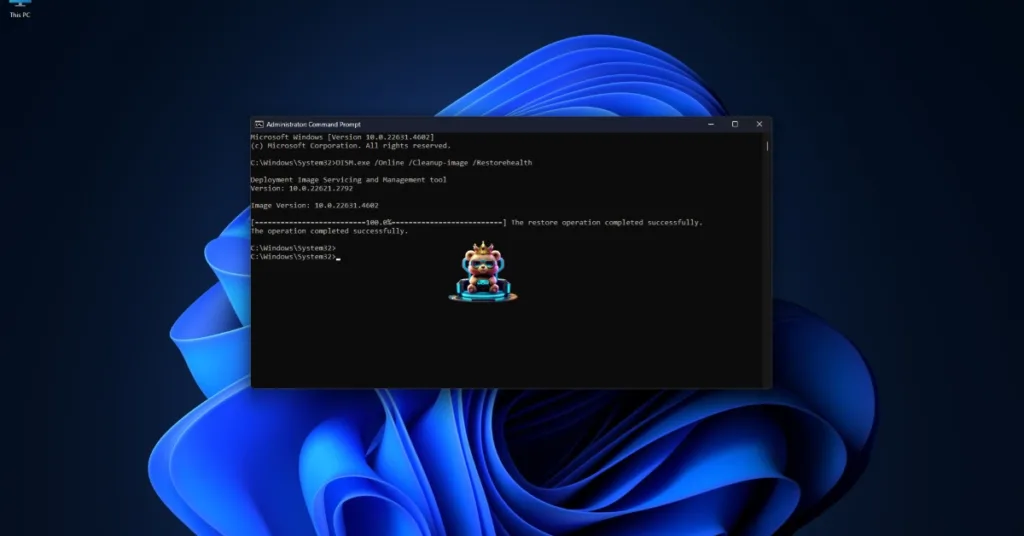
- Once done, type DISM.exe /Online /Cleanup-image /Restorehealth and press Enter again.
- Let that be complete as well.
- Launch EA SPORTS FC 26, and it won’t crash at startup.
That should conclude this EA SPORTS FC 26 guide on how to fix the game crashing at startup. There haven’t been many confirmed fixes regarding this issue, so I hope EA takes action quickly. I hope that you found this guide helpful. Also, if you are facing errors and issues while playing other games on PC and handhelds, head to our hub of commonly occurring PC errors and their fixes.


wow your article is simply a masterpiece, i like that, keep it up and will be checking for new update. do you post often? you can check the biggest webdesign freelancer in platform in germany called https://webdesignfreelancerdeutschland.de/ Thank you