Arena Breakout: Infinite is rising in popularity among players, getting positive reviews from critics and players alike. Running on Unreal Engine 4, this tactical extraction FPS provides an immersive and fun experience for the players. However, players are reporting a certain error while launching the game, which is preventing them from playing it. This guide will take you through how to fix the XINPUT1_3 DLL error while trying to launch Arena Breakout: Infinite.
Arena Breakout: Infinite XInput Startup Crash Fixed on PC
Reports claim that the game fails to launch, and the player is met with the following error:
Error Code 193 Failed to load xinput1_3.dll. The file is missing or corrupt! Trying to re-install program may fix the problem.
After doing some research, we have found the fix for the X_Input Error. Here’s how you can fix the error and get back to enjoying Arena Breakout: Infinite.
Fix: Delete the XINPUT1_3.dll and Run DirectX Setup (Confirmed Fix)
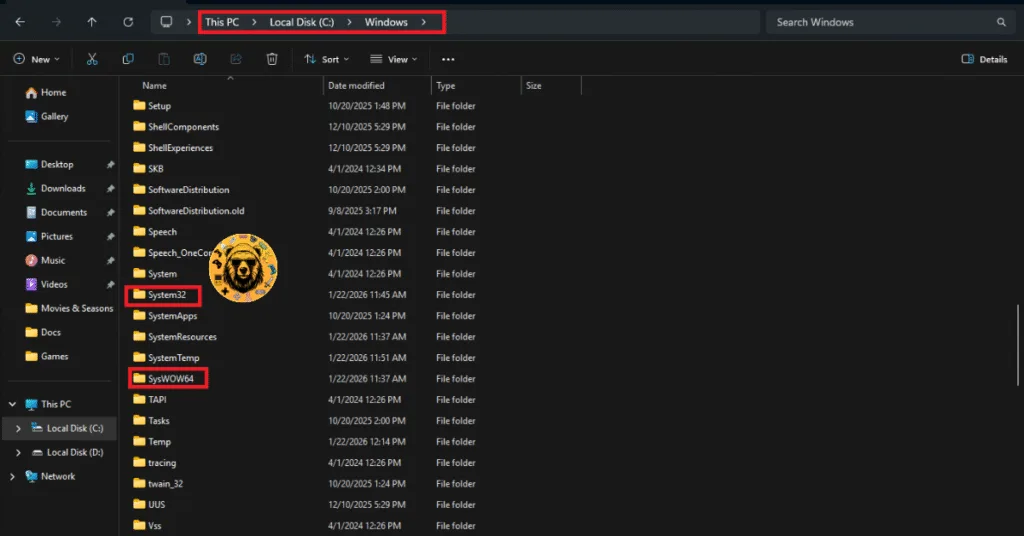
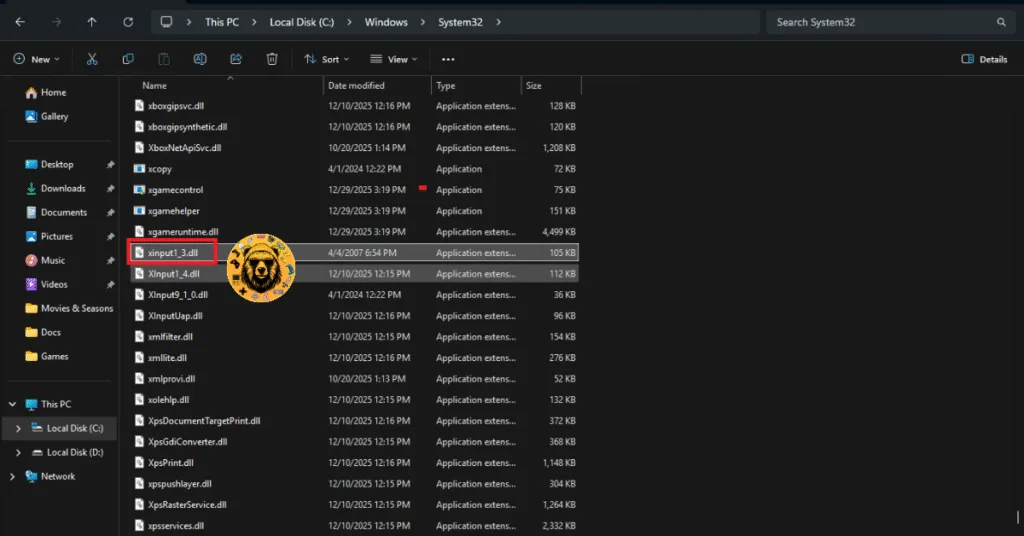
There is an issue with your X_Input dll file, which is causing Arena Breakout: Infinite to crash on your PC with the XINPUT1_3 error. To fix this, delete the X_INPUT1_3.dll file from both the System32 folder and the SysWOW64 folder. Additionally, you will need to take some further steps. Below, I have explained the process:
- Go to the C drive, open the Windows folder
- Open the System32 and SysWOW64 folders, and delete the X_INPUT1_3.dll file from both of them.
- Restart your PC, follow the same steps above, this time, delete the X3DAudio1_7.dll file from the same folders.
- Restart your PC and reinstall the DirectX web installer from this link.
- After installing it, restart your computer once again.
- Launch Arena Breakout: Infinite and the X_input error will be fixed.
And that is all you gotta do to fix the X_INPUT error on your PC while trying to launch Arena Breakout: Infinite. This fix is confirmed by a user on Steam and will resolve the issue for you as well. I hope that this guide has helped you.