
High on Life 2 runs on Unreal Engine 5, a game engine synonymous with shader compilation crashes and stutters. Performance and optimization issues aside, it is a fun game at its core. If you are looking for the game’s save files on your PC, so you can move them to another device or back them up, then you have come to the right place. Here is where you’ll find your High on Life 2 save file on your PC (Windows and Linux) and Steam Deck.
High on Life 2 Save File Location for Windows, Linux, and Steam Deck
| Client | Save File Location |
|---|---|
| Steam (Windows) | C:\Users\“your username”\AppData\Local\HighOnLife2\Saved\SaveGames |
| Steam (Linux) | [SteamLibrary-folder]/steamapps/compatdata/2069250/pfx/drive_c/users/steamuser/AppData/Local/HighOnLife2/Saved/SaveGames/ |
| Steam Deck | /home/deck/.local/share/Steam/steamapps/compatdata/2069250/pfx/drive_c/users/steamuser/AppData/Local/HighOnLife2/Saved/SaveGames/ |
Windows users can alternatively paste the following address in the address bar of Windows Explorer or Windows Run (Win + R) to directly open the save file folder of the game.
%LOCALAPPDATA%\HighOnLife2\Saved\Config\Windows\
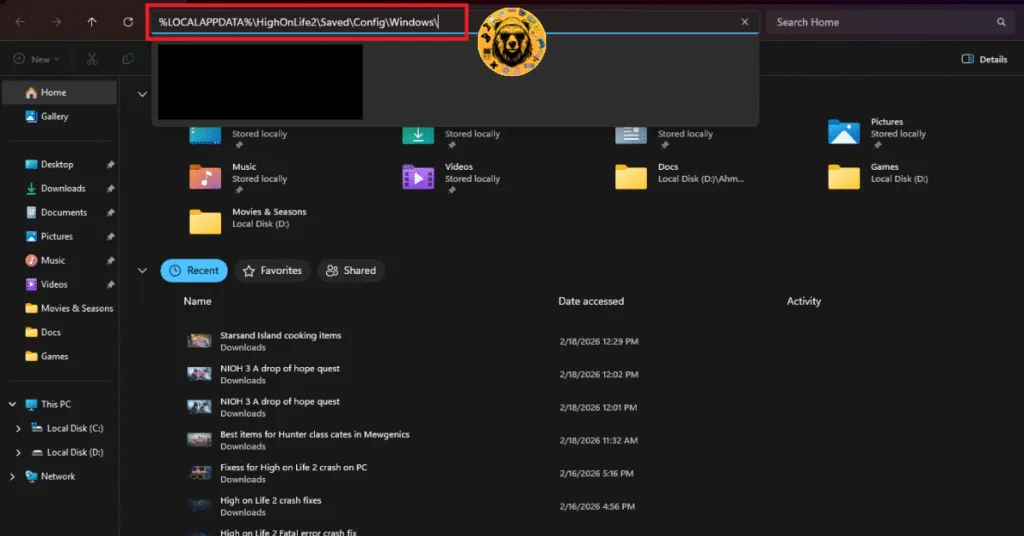
You’ll find .sav files inside the “SaveGames” folder, which obviously are your save files for High on Life 2. Since Steam has cloud synchronization, you don’t need to move your save files to the new device. Steam will automatically synchronize your saves and download them to the new device, provided you are using the same account and cloud synchronization is enabled.
How Many Save Slots Does High on Life 2 Have?
High on Life 2 offers three save slots, meaning you can have three different playthroughs of the game at the same time. To load from the specific save slot, launch the game, choose the “Load” option, and select your save slot to continue your playthrough.
How to Save in High on Life 2?
High on Life 2 does not allow manual saves, meaning you can’t save your progress yourself. Instead, the game auto-saves your progress at specific points. The game features a generous auto-save feature, as it saves your progress frequently. When an icon is displayed at botton-right corner of your screen, the game is saving your progress.
That is all for our High on Life 2 guide on where to find its save files on Steam Deck, Windows, and Linux. For more on the game, see our other guides and fixes for it.