Enshrouded is a light survival action RPG that runs on the Holistic Engine. Developed by Keen Games, the game offers a vast, hand-crafted world where players can explore various environments and uncover secrets. However, some players are struggling to find the save file location for the game. If you are one of them, then follow this guide to find out the save file location for Enshrouded.
Enshrouded Save File Location For Steam and Linux
| Client | Save File Location |
| Steam (cloud save enabled) | C:\Program Files (x86)\Steam\userdata\yourSteamID\1203620\remote |
| Steam (cloud save disabled) | C:\Users\yourusername\Saved Games\Enshrouded |
| Steam (Linux) | [SteamLibrary-folder]/teamapps/compatdata/1203620/pfx/ |
- You can find “yourSteamID” under in-game Settings. Your friend code is “yourSteamID”
- “C:\Program Files (x86)” may vary depending on where Steam is installed.
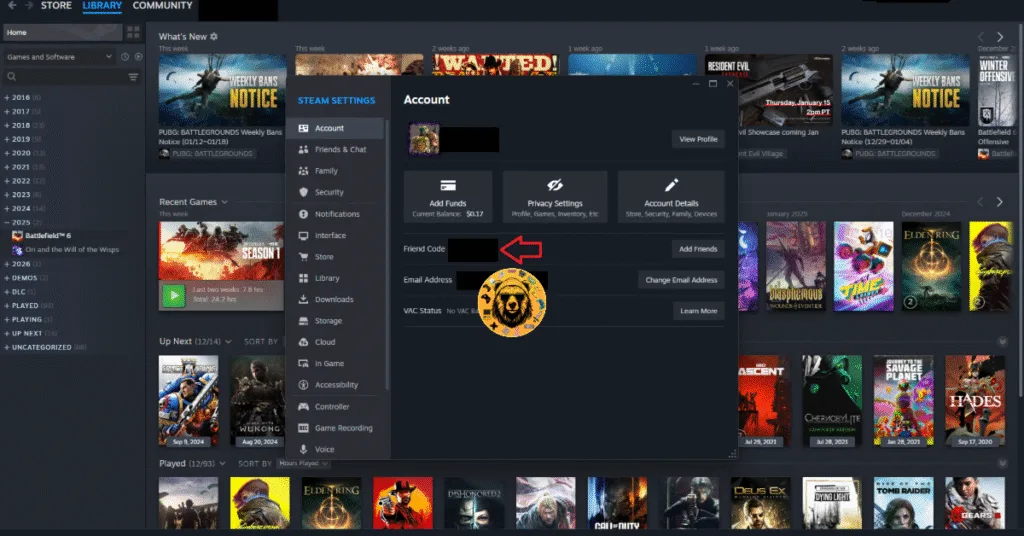
Don’t know how to save your progress in Enshrouded? The game saves your progress when you select the Return to Main Menu or Exit to Desktop options from the in-game menu using the ESC key. You might have noticed this too that it doesn’t matter where in the game world you save your game, you always load in at the nearest Flame Altar from your last location.
How Can I Back Up My Enshrouded Saves?
Indeed, you can back up your save files, and it’s easy to do so. First, navigate to the directory of Enshrouded save files through the paths I mentioned above. Now, select the entire folder or specific save file you want to back up. Copy the selected files and paste then itnto an external hard drive or a different folder on your computer. That should do the trick.
Backing up your save files is really important because players have been complaining that Enshrouded does not save progress correctly in certain situations. Wouldn’t want any save failures, right? Well, the Enshouded team did try to make the save data system more robust. But if we look at the reports, we get that it’s really not that reliable. So yeah, keep your save files backed up.
How Can I Delete an Enshrouded Save File
If, for any reason, you want to delete an Enshrouded save file, follow these steps:
- Launch the game and click Play.
- Choose either Private or Multiplayer.
- The game will ask whether you want to continue in one of your existing worlds.
- Click the Edit button and choose Delete.
And that should answer your question on where to find the save files for Enshrouded. I hope that this guide helped you.