2026 is going great with all the new games releasing like Code Vein II, Hytale, Highguard, and more. One of these is Cairn, a unique rock-climbing simulation adventure game released for both PlayStation 5 and Windows PC. You wouldn’t want to do your climbing journey on 20 FPS, would you? That’s what has been happening to players, who claim that Cairn isn’t running on high FPS and is giving out poor performance. Here, I will help you fix Cairn performance issues on your Windows PC.
Cairn Low FPS Fixed on PC
Reports claim that PC players are experiencing performance issues while trying to play Cairn. It seems like the game fails to deliver more than 20 FPS, even on high-end PCs. A player on Steam has found the fixes for all of the struggling players. Let’s take a look at how you can fix Cairn’s poor performance on PC.
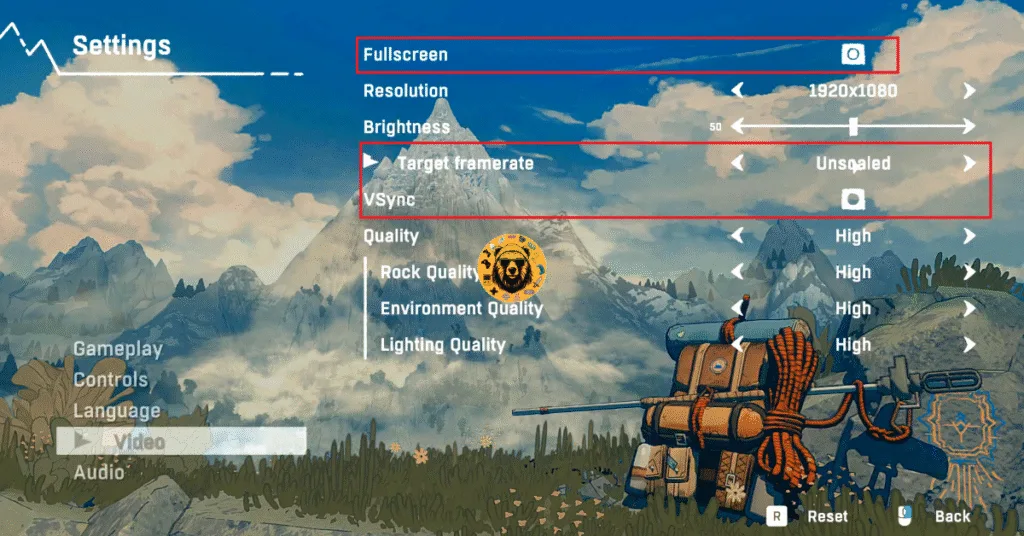
- In your game’s settings, enable Fullscreen.
- Make sure your FPS isn’t limited and that you’re playing Cairn at an unlocked framerate.
- Ensure VSYNC is off.
Once you have applied these settings, follow the steps below:
- Open your Steam Library and right-click Cairn.
- Select Properties.
- Add “-force-d3d12 -windowed -borderless” without quotes under “Launch Options”.
- Launch Cairn, and the performance issues should be fixed.
For some people, this fix works with Fullscreen enabled, while for some it works with it being disabled. Try both and see which one works for you.
And that’s how you fix Cairn performance issues on your PC. If you are facing errors and issues while playing other games on PC and handhelds, head to our hub of commonly occurring PC errors and their fixes.