REANIMAL is a horror adventure game from the developers of Little Nightmares 1 and 2. Like their previous games, REANIMAL runs on the Unreal Engine, Unreal Engine 5 (UE5) to be specific. However, some PC players are unable to play the game, as it crashes at startup with the UE-Everholm Low Level Fatal error. I have compiled some fixes here that will resolve the REANIMAL LowLevelFatalError crashes on your Windows PC.
Working Fixes for REANIMAL Unreal Engine Crash on PC
PC players report that REANIMAL is crashing at launch, and the following Unreal Engine error pops up:
The UE-Everholm Game has crashed and will close
LowLevelFatalError [File:C:\BuildAgent\work\dce80ec8e0f61a\Engine\Source\Runtime\RenderCore\Private\ShaderCoreArchive.cpp] [Line: 413]
DecompressShaderWithOodleAndExtraLogging(): Could not decompress shader group with Oodle. Group Index: 493 Group IoStoreHash: 69cdc691a43e11bd01f45bf09 Group NumShaders: 15 Shader Index: 9720 Shader In-group Index: 493 Shader Hash: A00DE6250F4AEB2D1DD3562FAEAFB9E754A005D. The CPU (Intel(R) Core(TM) i7-14700K) may be unstable; …
This particular Fatal Error is occurring due to Unreal Engine 5 being unable to decompress shaders, which mostly happens on Intel 13th and 14th generation CPUs due to their overvoltage issue. REANIMAL isn’t the only game experiencing the LowLevelFatalError crashes, as games like Borderlands 4, The Outer Worlds 2, and Oblivion Remastered also faced the same error. The following fixes will resolve the UE-Everholm Game Has Crashed LowLevelFatalError crash in REANIMAL on your PC.
Fix #1 – Update BIOS or Underclock Performance Core Ratio (Intel 13th and 14th Gen)
If you are using an Intel 13th or 14th generation CPU, then it is the likely culprit for the Low Level Fatal Error crashes at startup in REANIMAL. As stated, these CPUs are known for their overvoltage issues, which result in games crashing on PC, particularly those using the Unreal Engine.
Even Oodle released a statement clarifying that these CPUs are the cause of various crashes in Unreal Engine games. You can fix the REANIMAL UE-Everholm LowLevelFatalError crash on your PC by updating your motherboard’s BIOS, as the latest ones contain the microcode that fixes the overvoltage issue on Intel Raptor Lake CPUs.
However, if the BIOS update doesn’t fix the LowLevelFatalError Unreal Engine crash, then there is a possibility that the processor is damaged. In that case, you have to reduce the performance core ratio to fix the LowLevelFatalError crash in REANIMAL.
- Download and install Intel Extreme Tuning Utility.
- Open the application and set the Performance Core ratio to 53x (If 53x doesn’t fix the crash, reduce it to 50x).
- Play REANIMAL, and the game will compile shaders without crashing.
If REANIMAL is crashing during shader compilation and displays the LowLevelFatalError message, reduce the Performance Core Ratio, run the game, and let the shaders compile. After the shaders are compiled, close the game, revert the Performance Core Ratio to its default value. Only underclock the Performance Core Ratio again if the game is crashing during gameplay with the same error.
Fix #2 – Clear Shader Cache and Increase its Size (NVIDIA)
It is clear from the error message that REANIMAL is unable to decompress its shaders. Unreal Engine 5 relies heavily on shaders for its performance and visuals. This is why PC games using this engine compile shaders when you first launch them. These shaders are stored in a cache.
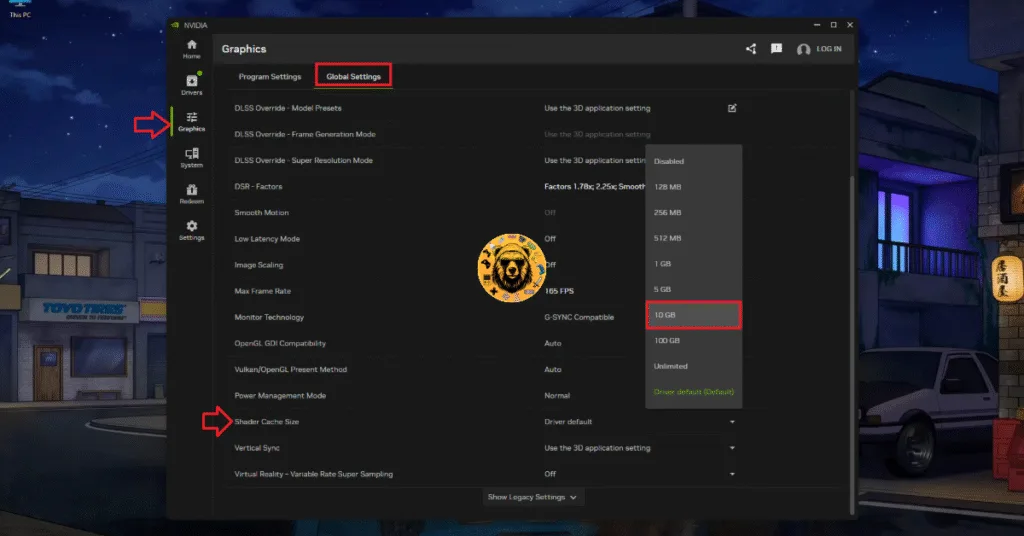
The reason for the REANIMAL LowLevelFatalError crashes is that the default shader cache size is too small, or the cache is corrupt. You can fix these LowLevelFatalError Unreal Engine crashes by clearing the cache and increasing its size. Here is how you can clear the cache and increase its size:
- Open the NVIDIA App and go to the “Graphics” tab.
- Then go to the “Global Settings” tab.
- Scroll down and find the “Shader Cache Size” setting.
- Select the “Disable” option and restart your PC.
- Go back to the “Shader Cache Size” setting and select 10GB or a higher value.
- Launch REANIMAL and the Fatal Error is now fixed.
Fix #3 – Run REANIMAL in Windows 8 Compatibility Mode
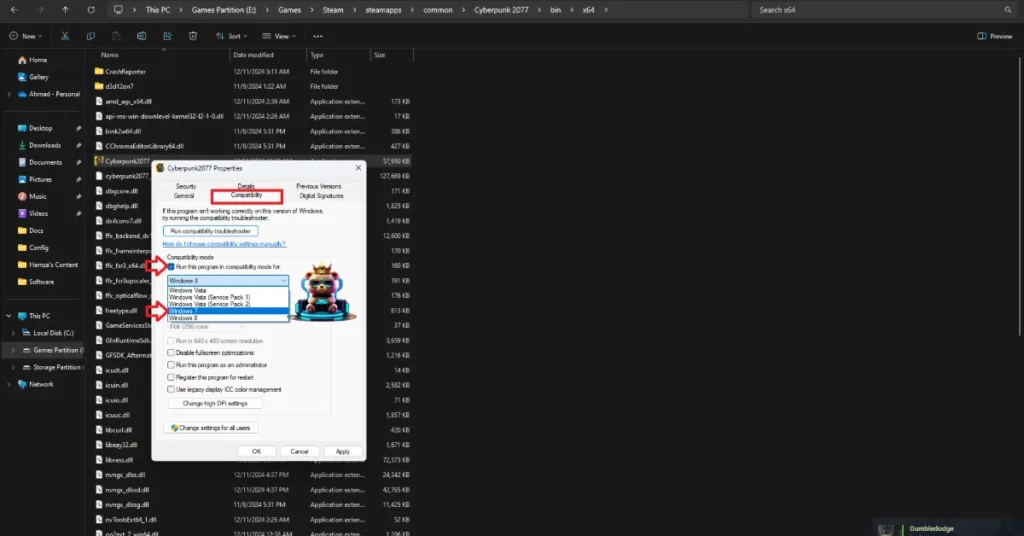
Compatibility issues with the current Windows version are crashing REANIMAL on your PC with the “UE-Everholm LowLevelFatalError” error. You can fix the error by forcing REANIMAL to run in Windows 8 compatibility mode. Here is how you can run the game in compatibility mode to fix the UE-Everholm LowLevelFatalError crash on your PC:
- Right-click REANIMAL in your Steam library, hover the cursor over “Manage”, and click the “Browse local files” option.
- A new window will open containing StarRupture’s game files.
- Right-click the game’s executable file (.exe file).
- In the context menu, click on Properties.
- In the Properties window, find and click on the Compatibility tab.
- Check the box next to Run this program in compatibility mode for: and select Windows 8.
- Click Apply and then OK to save your settings.
- Play REANIMAL and the Unreal Engine Low Level Fatal Error crashes are fixed.


These REANIMAL fixes will resolve the Unreal Engine LowLevelFatalError crashes on your PC. If you are facing errors and issues while playing other games on PC and handhelds, head to our hub of commonly occurring PC errors and their fixes.