
Resident Evil Requiem launched with incredble reception from critics and players. Running on Capcom’s proprietary RE Engine, the game looks and runs incredibly well on PC. Despite the optimizations, PC users are experiencing issues like Fatal D3D Error crashes and the White Texture issue. The fix for the white texture issue in Resident Evil 9 Requiem is a simple one, and I’ll guide you on how you can apply it.
Resident Evil Requiem White NPCs Fix
According to PC users, all the NPCs in the game have white textures. This is a bug in the game that turns all the character textures to white.

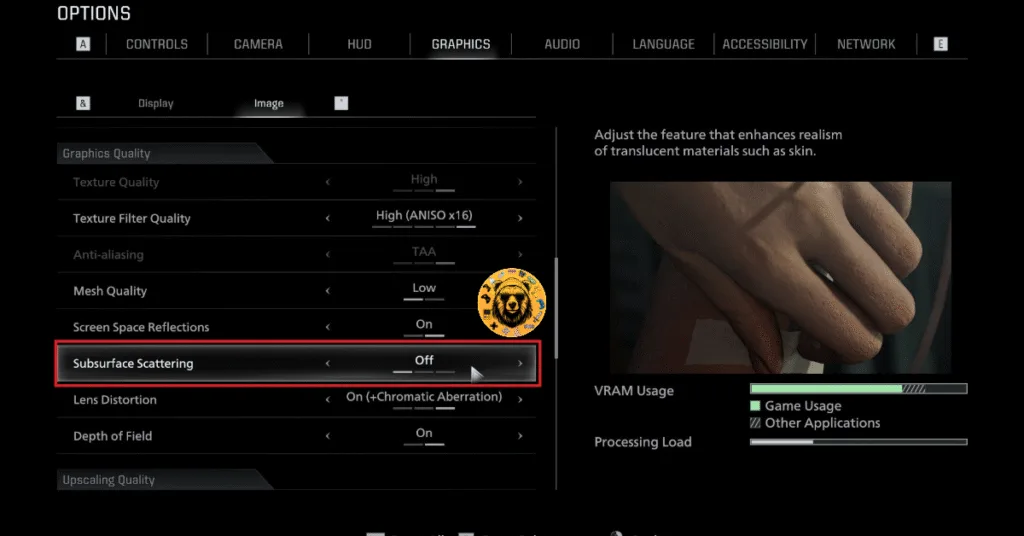
To fix the White Texture issue in Resident Evil 9, disable the “Subsurface Scattering” graphics setting. Apparently, this particular graphics setting is causing all the NPC textures to turn white. Here is how you can disable Subsurface Scattering in RE9 to fix the white texture issue:
- Open the settings menu on RE Requiem.
- Go to the “Graphics” tab.
- Open the “Image” tab.
- Scroll down and click on “Advanced Settings“.
- Scroll down to “Graphics Quality,” and you’ll find the “Subsurface Scattering” setting.
- Turn it off and the white texture issue will be fixed in Resident Evil 9.
That is all for our Resident Evil 9 Requiem fixes for the white NPC texture issue on PC. If you are experiencing errors and crashes in games, also see our fixes hub for commonly occurring errors for PC and handhelds.