Mods allow players to customize various aspects of a game, including game mechanics, graphics, and more. You can add mods in Warhammer 40k Dawn of War Definitive Edition, which will make your experience a lot of fun.
Modding a remaster is different from the original. Follow this guide to install mods in Dawn of War Definitive Edition.
How Can I Install Mods in Warhammer 40K Dawn of War DE
| Step | Action |
|---|---|
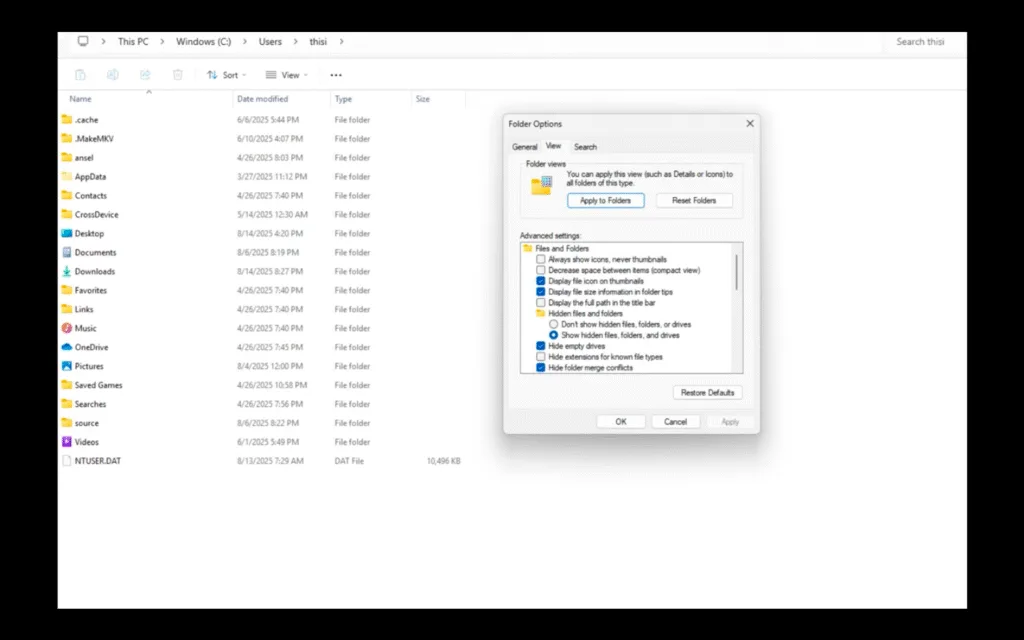
| 1 | Enable hidden files and go to AppData\Roaming\Relic Entertainment\Dawn of War |
| 2 | Create a Mods folder if missing |
| 3 | Add each mod into its own subfolder within Mods |
| 4 | Launch game via Mod Organizer from main menu |
| 5 | Test mods individually for stability and compatibility |
| 6 | Monitor mod developers for updates for DE |
Before installing any type of mods, ensure that you have a separate folder for easier and cleaner management. Just make sure not to create the dedicated mods folder in the install directory. Follow my lead:
- Go to the following location and create a new folder called “Mods”
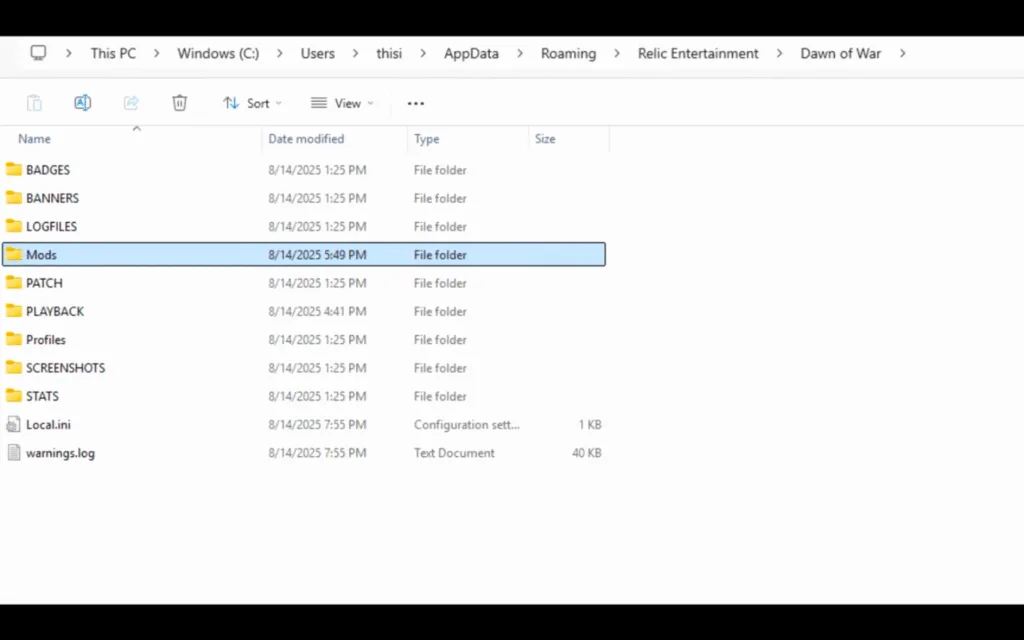
C:\Users[Windows Username]\AppData\Roaming\Relic Entertainment\Dawn of War\
- Create individual folders for each mod in the folder you just created.
- Let’s take the Redux Mod as an example. Create a folder named “Redux” and place the mod files in it. Just don’t do that in the root Mods folder.
You may be wondering, Where do I get the mod files? You can find a lot of different and user-made mods on Moddb or Nexus Mods.
Not every mode will work for the remaster that did for the original. Finding mods for the remastered version of a game can be difficult compared to the original one, so stay patient until the author releases your desired mods.
One more thing, some mods require you to download other mods too, to work properly. So keep an eye out for that too. I also highly recommend that you only install one mod first to test if everything is working fine because sometimes there can be a conflict.
Some popular Warhammer mods like Unification and Ultimate Apcalypse are being updated for DE so it might take some time before the full catalog of Warhammer mods work with the Definitive Edition.
While not mandatory, a mod manager can streamline installation and troubleshooting, especially for complex mods like Unification. But there is an in-game mod manager in Warhammer 40K DE and mods placed correctly will appear here. It is a very simple mod manager where you can enable and disable mods. For a more complex UI and extensive options try a different mod manager.
That’s all for this Warhammer 40K Dawn of War Definitive Edition guide on how to install mods. If you don’t find your desired mods, wait, as the game is a remaster. Mods for remaster take some time to be published. I hope that this guide helped you.