

Update: NVIDIA has officially rolled out support for DLSS 4.5 through its NVIDIA App. You don’t need to install the Beta branch of the app to use DLSS 4.5.
NVIDIA doesn’t seem to be slowing down to push Deep Learning Super Sampling (DLSS) to its limits. Last year, NVIDIA rolled out DLSS 4, which introduced the new Transformer Model DLSS Super Resolution. It was a huge leap from the previous CNN model. Now, NVIDIA has further iterated on its Transformer model with DLSS 4.5, which is available to PC users to try out. Here is how you can use the NVIDIA DLSS 4.5 on your PC.
Enable DLSS 4.5 Preset in NVIDIA App
Since DLSS 4.5 has just been announced, at the time of writing, no game supports it natively as of yet. However, the NVIDIA App allows PC users to override the DLSS preset or model in games that have DLSS support, regardless of what version they are using.
The second-generation Transformer model DLSS (DLSS 4.5) override is yet to be released on January 13, but you can still use it using the Beta branch of the NVIDIA App. Here is how you can use the Beta branch of the NVIDIA App and enable the DLSS 4.5 Super Resolution override:
- Install the NVIDIA driver version 591.74 along with the NVIDIA App.
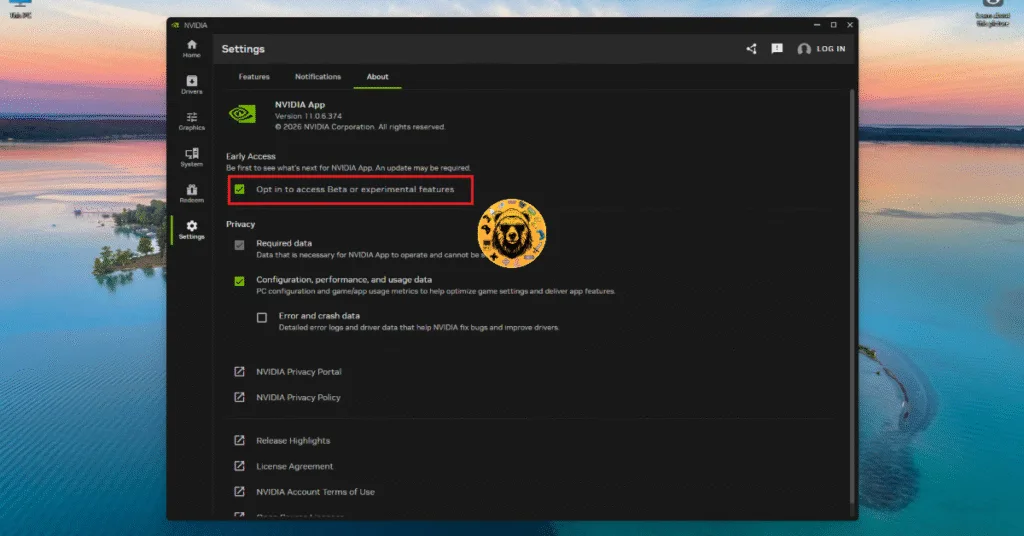
- Open the NVIDIA App and go to the “Settings” tab.
- Select the “About” tab,
- Check the “Opt in to Access Beta or experimental features” setting.
- Shortly after that, you’ll see a pop-up at the top of the NVIDIA App that the new version is available.
- Click the “Relaunch app” button to install the Beta branch of the NVIDIA App.
- Open the app again and it’ll install the new version.
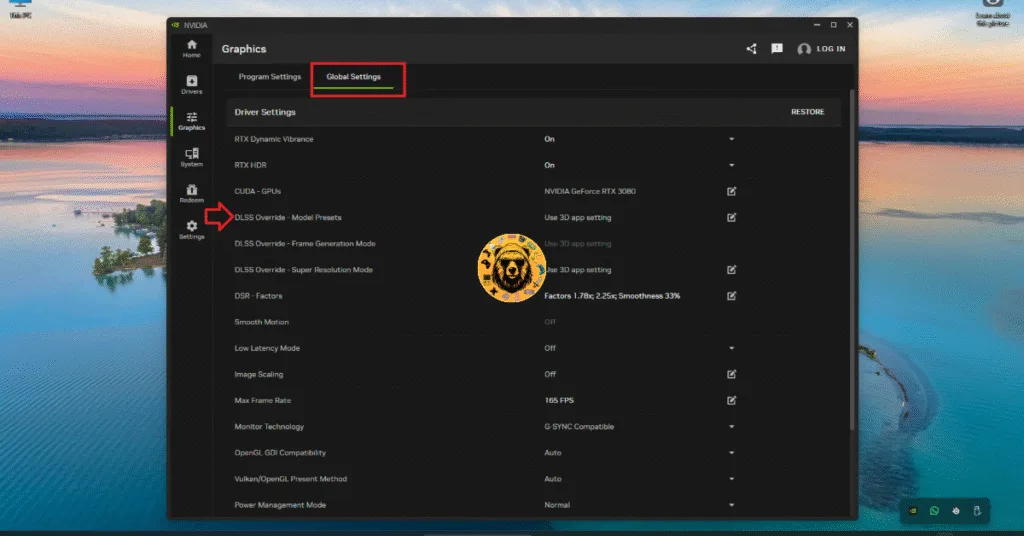
- Once the Beta is installed, open the “Graphics” tab in the NVIDIA App.
- You can force DLSS 4.5 Super Resolution on a game-by-game basis or globally. The latter would apply DLSS 4.5 to all games that use DLSS.
- Find and click the “DLSS Override – Model Presets” setting.
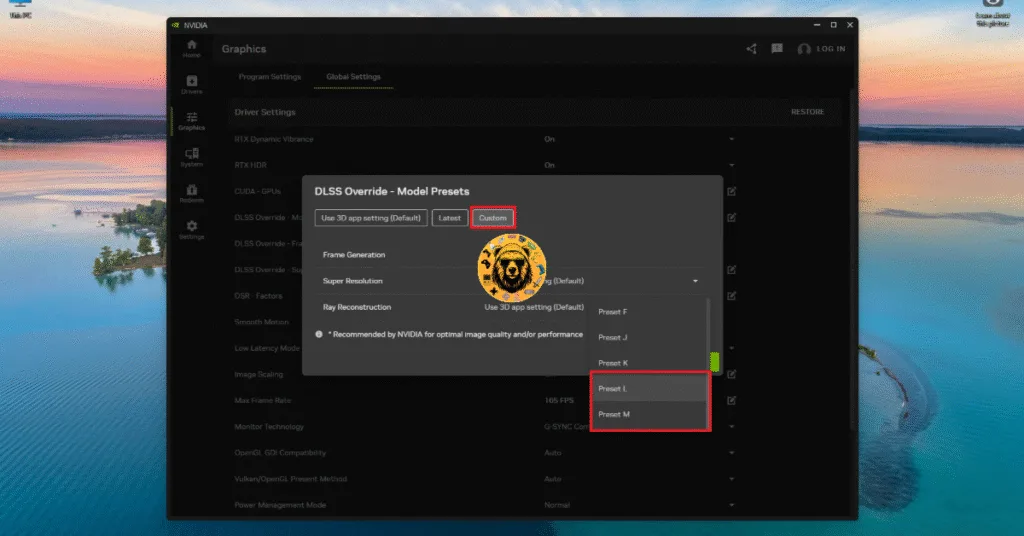
- Select the “Custom” tab option.
- Click the drop-down menu next to the “Super Resolution” setting.
- Preset L and Preset M are DLSS 4.5 presets. Choose either one and apply the change.
- Play your games, enable DLSS in-game, and they’ll run on the second-generation Transformer model, aka DLSS 4.5.
The Preset L is specifically designed for DLSS Ultra Performance, which means that if you are using DLSS Quality, Balanced, or Performance, then use Preset M. Only use Preset L if you are using Ultra Performance. Also, using DLSS 4.5 has a noticeable performance penalty on RTX 20 and 30 series GPUs, while RTX 40 and 50 series GPUs will only see a negligable loss in FPS.
How to Check If the DLSS 4.5 Preset Override is Working?
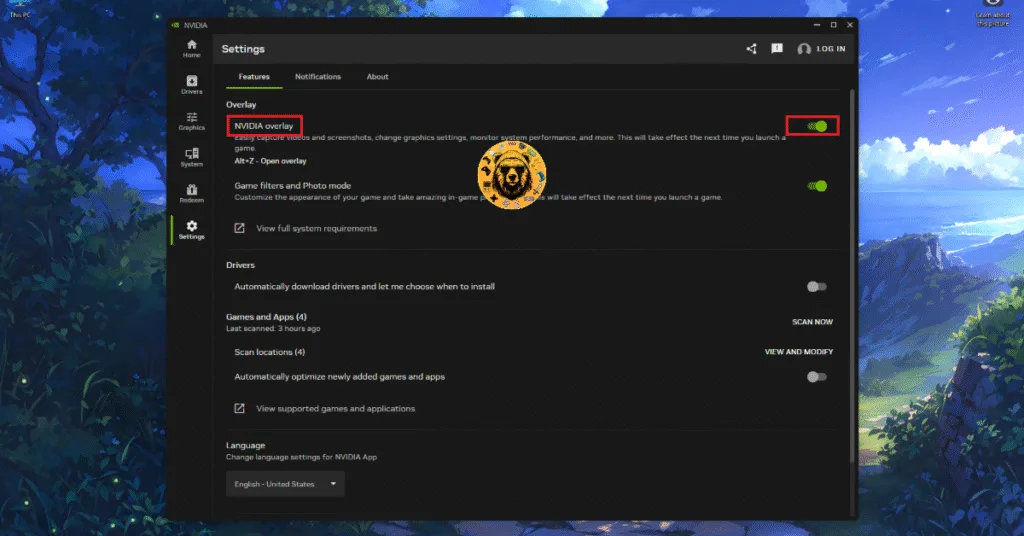
After you have overridden the DLSS preset through the NVIDIA App, you can check in real time if the DLSS 4.5 override is working or not. For that, NVIDIA Overlay has to be enabled. Here is how you can enable NVIDIA Overlay and check if the DLSS override is working in the game:
- Open the NVIDIA App.
- Go to the “Settings” tab and toggle the NVIDIA Overlay setting.
- Launch the game.
- Press the ALT+Z buttons.
- Select the “Statistics” option at the bottom.
- Select “DLSS” for the “Statistics view” setting.
- DLSS metrics will start to display, and you can check if the selected DLSS Preset is working or not.
That is how you can use the second-generation Transformer model DLSS 4.5 on your PC. What are your throughts in this new DLSS preset? Is it worth the performance penalty in RTX 20 and 30 series GPUs? Let us know in the comments.




Kunststof Brillenmonturen EdamAambeeldstraat, 1135 GC Edamhttp://kunststofkozijnenedam.nl/Kunststof brillenmonturen leveren veelzijdige keuzes in Nederland.
Kunststof brillenmonturen vereenvoudigen een brede keuze
in kleuren en vormen. Kunststof brillenmonturen verzorgen zowel herenbrillen als damesbrillen. Kunststof brillenmonturen verschaffen ook kinderbrillen en sportbrillen. Kunststof brillenmonturen verschaffen een assortiment van transparante en gekleurde monturen. Kunststof
brillenmonturen zorgen voor comfortabele pasvormen door lichtgewicht materiaal.
Kunststof brillenmonturen verschaffen garantie op duurzaamheid.
Kunststof brillenmonturen bieden multifocale glazen voor verschillende sterktes.
Kunststof brillenmonturen faciliteren oogzorg met een oogmeting.
Kunststof brillenmonturen helpen de optie om zonnebrillen te bestellen. Kunststof brillenmonturen verlenen acetaat en plastic als materiaalkeuze.
Kunststof brillenmonturen leveren transparante kunststof brillenglazen. Kunststof brillenmonturen verlenen titanium en metalen als alternatieve monturen. Kunststof brillenmonturen zorgen voor een breed assortiment aan merken.
Kunststof brillenmonturen bieden aantrekkelijke prijzen voor elke klant.
Kunststof brillenmonturen ondersteunen onderhoud
en reparatie. Kunststof brillenmonturen ondersteunen ook de keuze
voor multifocale lenzen. Kunststof brillenmonturen verschaffen coatings voor
extra bescherming. Kunststof brillenmonturen bieden leesbrillen voor optimaal
zicht. Kunststof brillenmonturen verschaffen een collectie van moderne en klassieke stijlen. Kunststof brillenmonturen verschaffen ook op
maat gemaakte oplossingen. Kunststof brillenmonturen ondersteunen een naadloze
brillenervaring in Nederland. Kunststof brillenmonturen verschaffen een perfecte balans tussen stijl en functionaliteit.
Kunststof brillenmonturen helpen een innovatieve kijk op brillenmode.