
Mewgenics is a tactical roguelike video game that became an instant success on PC, as it is a PC exclusive title at the time of writing. It isn’t a demanding game at all, but still, PC users are experiencing the Mewgenics not launching issue. Clearly, you are here to find out where the saves for the game are stored on your PC or Steam Deck. The following is the Mewgenics save file location on PC.
Mewgenics Save Location on PC and Steam Deck
| Client | Save File Location |
|---|---|
| Steam (Windows) | C:\Users\your username*\AppData\Roaming\Glaiel Games\Mewgenics\Steam ID**\saves |
| Steam (Linux) | [SteamLibrary-folder]/steamapps/compatdata/686060***/pfx/ |
| Steam Deck | /home/deck/.local/share/Steam/steamapps/compatdata/686060***/pfx/ |
In the “saves” folder, you’ll find .sav files, which are your Mewgenics saves. Each .sav file will be for each active campaign.
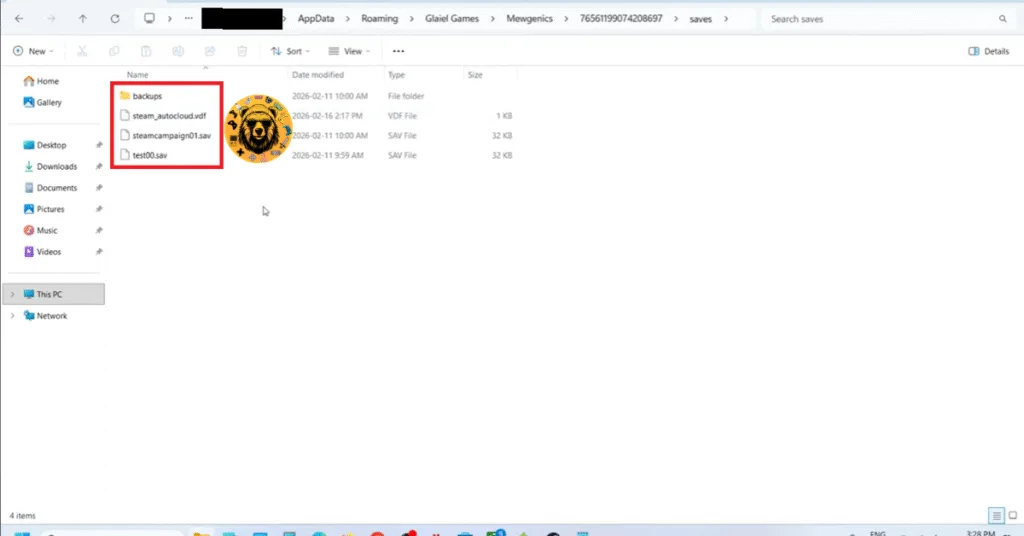
Also, Windows users can directly access the “saves” folder by pasting the following address in the Windows Explorer address bar or Windows Run (Win + R).
%APPDATA%\Glaiel GamesMewgenics\Steam ID\saves
Does Mewgenics Has Back Up Saves?
Yes, Mewgenics automatically creates back-ups of your saves, including a copy of your current save file in the “backups” folder. In case your save file gets corrupted, you can copy the backup save from the “backups” folder, rename it as your current save file, and you’ll restore your gameplay progress.
*Replace the “your username” in the save location path with your Windows PC username.
** Steam User ID is a 17-digit unique identifier for your Steam account. Open Steam, click your profile name at the top right, select “Account details” option, your Steam ID will be under your username.
***Steam app ID is unique to every PC and Steam Deck. To find the App ID, right-click Mewgenics in your Steam library > properties > Updates. The App ID will be listed here.
That is all for our Mewgenics guides on how to locate its save file on PC. For more on the game, also see our other guides and fixes for Mewgenics.