
REANIMAL is kind of a spiritual successor to Little Nightmares, as it is developed by the same studio behind Little Nightmares 1 and 2. However, the PC version of the game didn’t launch in good condition, as PC users report technical and performance issues, and crashes, such as LowLevelFatalError crashes. But that’s not why you are here. If you are looking for where REANIMAL saves are stored on your PC, then you have come to the right place. The following is the save file location for REANIMAL on PC and Steam Deck.
REANIMAL Save File Location on Steam Deck, Linux, and Windows
| Client | Save File Location |
|---|---|
| Steam (Windows) | C:\Users\your username*\AppData\Local\REANIMAL\Saved\SaveGames\“your userID“\ |
| Steam (Linux) | [SteamLibrary-folder]/steamapps/compatdata/2129530*/pfx/drive_c/users/steamuser/AppData/Local/REANIMAL/Saved/SaveGames/ |
| Steam Deck | /home/deck/.local/share/Steam/steamapps/compatdata/2129530**/pfx/drive_c/users/steamuser/AppData/Local/REANIMAL/Saved/SaveGames/ |
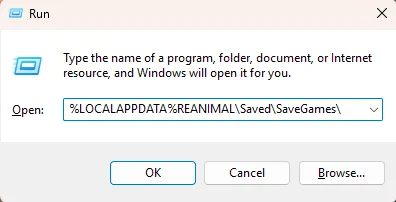
Windows users can alternatively paste the following address in the Windows Explorer address bar or Windows Run (Win + R) and press Enter to get to the REANIMAL save file folder directly.
%LOCALAPPDATA%REANIMAL\Saved\SaveGames\
*Replace the “your username” in the save location path with your Windows PC username.
**Steam app ID is unique to every PC and Steam Deck.To find the App ID, right-click REANIMAL in your Steam library > properties > Updates. The App ID will be listed here.
That is all for our REANIMAL guide on how to find its save files on PC and Steam Deck. For more on the game, check our other fixes and guides for REANIMAL.