If you want to be a kingpin in Schedule 1, then there are two ways to do it. Either learn to master the mixing station, employee management, and learn the best recipes, or use cheat codes to build your empire in no time.
You can get unlimited money and even enter God Mode in Schedule 1. The game, by default, doesn’t support cheat codes. You can use these cheat codes either by using console commands or through any mod. I will explain both and let you choose what’s best for you.
How To Use Cheat Codes Using Console Commands: Schedule 1?
If you have complete early access to the gam, then you don’t need to install any mods to use these cheat codes. Rather than, you can go moddless by using the built-in console to write these commands. Here’s how you can unlock the built-in console to play like a God.
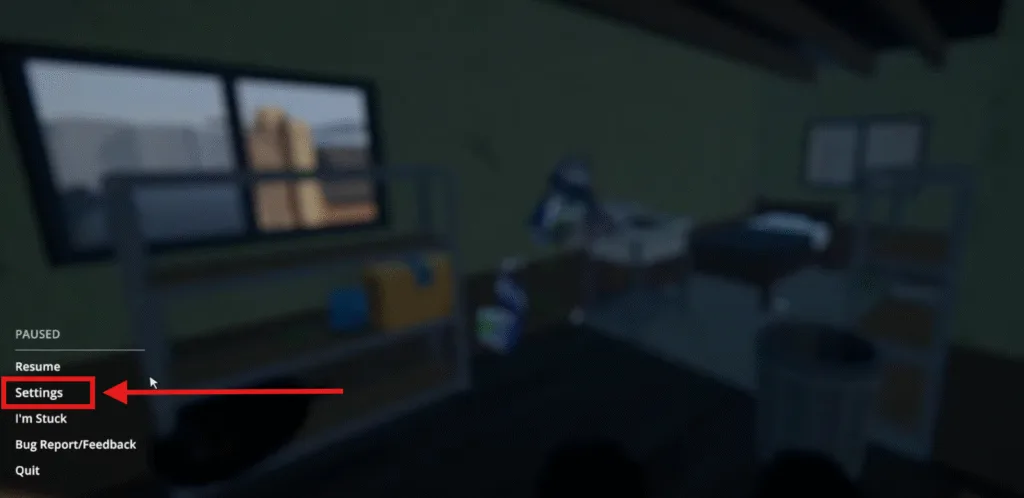
- Launch the game and press ESC to enter the pause menu, select settings from there.
- From the settings menu, a menu box will appear. Under the game tab, you will see the console option.
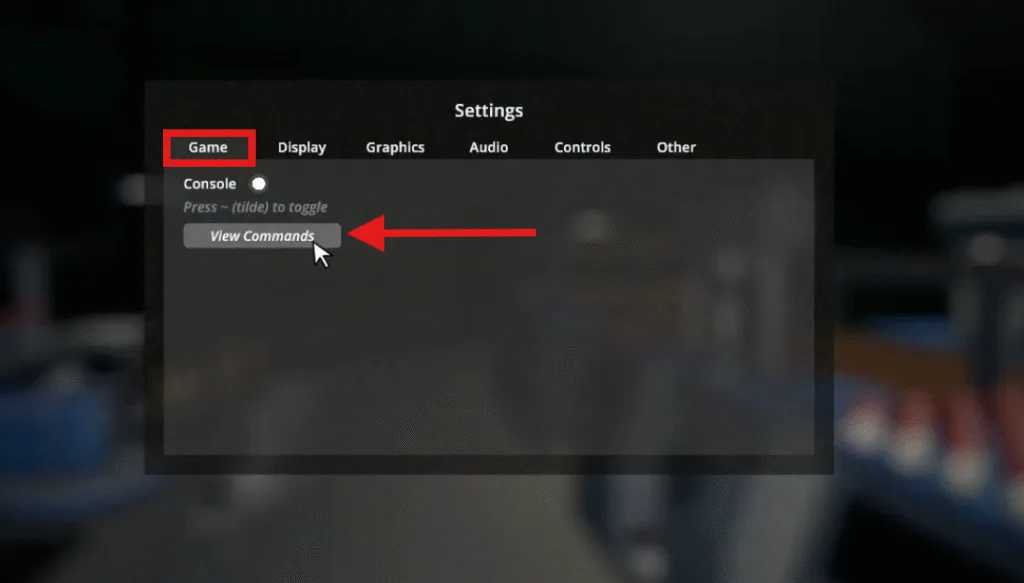
- To view all the console commands, select view commands, and you will see a list of built-in cheat codes. You can try as many as you want according to your specific needs.
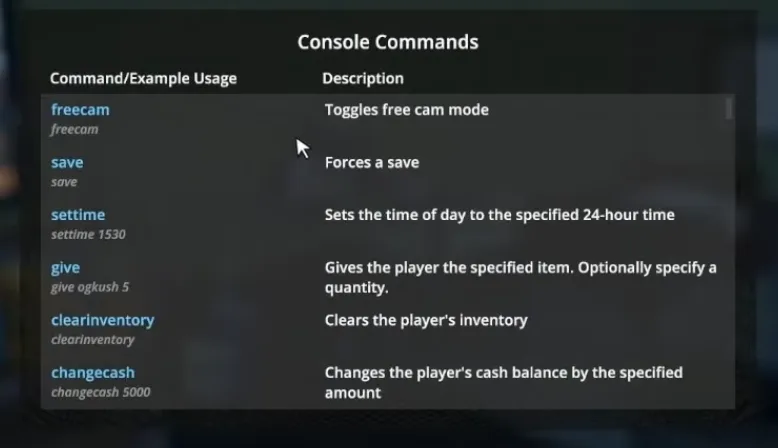
- To enter any cheat code in the console, you need to press the tilde ~ symbol under the Esc key. The tilde key will open a console window in the top left corner, where you can enter any cheat code. As an example, I entered the freecam console command, and after writing the command, press Enter.

- This freecam will allow you to look around freely from the in-game cam.

Console Commands In Schedule 1
If you don’t want to go with mods, you can instead use these console commands to have everything you want:
| Console commands | Description (use) | In Game Command example |
|---|---|---|
| addemployee | Adds an employee to make it easier for you to automate your drug-making process. | addemployee place |
| addxp | Adds experience points to your character, which allows you to level up and unlock new places to sell your products. | addxp 5000 |
| bind | Bind the specified key to a command. | bind t ‘settime 1230’ |
| changebalance | Not all stores accept cash, and they only take online balance. Normally, you need to use the ATM to transfer your cash into your online balance. Using this, you can directly increase your balance. | changebalance 5000 |
| changecash | Increases your cash amount. | changecash 5000 |
| clearbinds | Clears all binds. | clearbinds |
| clearinventory | Clears your inventory slots. | clearinventory |
| clearwanted | Clears the wanted level of the police. | clearwanted |
| enable | Enables the specified Game Object. | enable pp |
| disable | Disables the specified Game Object. | disable pp |
| freecam | Toggles free cam mode. | freecam |
| give | Get an item in your hand. | give watering_can |
| growplants | Sets all plants in the world fully grown. It saves you a lot of time. | growplants |
| hideui | Hides all on-screen UI. | hideui |
raisewanted | Raises the player’s wanted level. | raisewanted |
| lowerwanted | Lowers the player’s wanted level. | lowerwanted |
| packageproduct | Helps you pack the equipped product. | packageproduct jar |
| save | Forces a save. | save |
| setdiscovered | Sets the specified product as discovered. | setdiscovered ogkush |
| setemotion | Changes your facial expression. | setemotion cheery/angry |
| setenergy | Changes your energy level. | setenergy 100 |
| sethealth | Sets your health points. | sethealth 100 |
| setjumpforce | Sets the player’s jump force multiplier. | setjumpforce 1 |
| setlawintensity | Sets the intensity of the police activity on a scale of 0-10. | setlawintensity 6 |
| setmovespeed | Sets the player’s move speed multiplier. | setmovespeed 1 |
| setowned | Sets a property as owned. | setowned laundromat |
| Setquality | Sets the quality of the equipped product. | setquality heavenly |
| setquestentrystate | Sets the state of the specified quest entry. | setquestentrystate <quest name> |
| setrelationship | Sets the relationship level with an NPC to the specified amount from 0-5. | setrelationship <npc_id> 5 |
| setstaminareserve | Increases stamina. | setstaminareserve 200 |
| settime | Changes the time of the day. | settime 1530 |
| settimescale | Increases the speed of the game. Sets the time scale. Default is 1. | settimescale 1 |
| setunlocked | Unlocks a particular NPC. | setunlocked <npc_id> |
| setvar | Sets the value of the specified variable. | setvar <variable> <value> |
| spawnvehicle | Spawns a vehicle at the player’s location. | spawnvehicle shitbox |
| teleport | Teleports the player to the specified location. | teleport townhall |
| unhideui | Unhides all on-screen UI. | unhideui |

If somehow you dont get access to the built in console commands you can try Installing Mods for Schedule 1.
How to get Infinite Money in Schedule 1?
To easiest way to get infinite money is to edit the game’s save file. Go to the save file location and edit the Money.json file with the text editor. I can’t show you how exactly to edit this, but you can run a quick search online and figure it out easily.
Change the amount of money you have to the amount of money you want, and boom! You’re rich. However, I have to say it does take the fun out of it.