The Yakuza franchise has seen a steady rise in popularity in the last decade. Now, Yakuza Kiwami 3 & Dark Ties have launched for PC. Yakuza Kiwami 3 is the remake of the original Yakuza 3, and Dark Ties is the expansion included in the game. While the game isn’t very demanding in terms of PC hardware, PC players are experiencing random freezes and crashes in the game. I have compiled some fixes that will resolve the Yakuza Kiwami 3 random crash issue on your Windows PC.
3 Ways to Fix Yakuza Kiwami 3 Keeps Crashing on PC
As per PC player feedback, the game crashes randomly while playing. It can crash while walking through the city or during a combat sequence. There are multiple reasons why you are experiencing these gameplay crashes in Yakuza Kiwami 3, and the following fixes will resolve them on your PC.
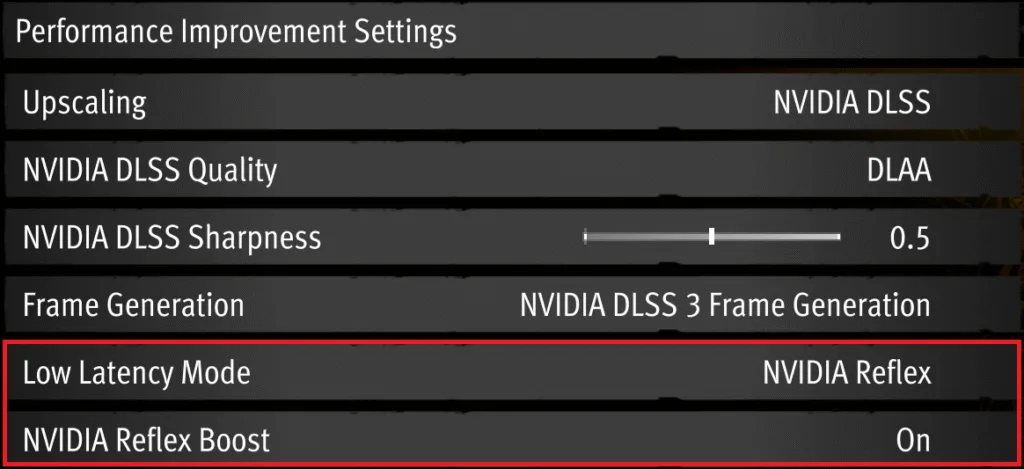
Fix #1 – Disable NVIDIA Reflex
Reflex is NVIDIA’s proprietary tech that reduces input latency, which is specifically useful when DLSS is enabled, as it can introduce input latency. However, this tech is the reason Yakuza Kiwami 3 & Dark Ties is crashing on your PC. To fix the crashes, disable NVIDIA Reflex in the game’s settings menu.
Fix #2 – Limit Yakuza Kiwami 3’s Max FPS
Yakuza Kiwami 3 allows PC players to unlock the framerate. Playing games at an unlocked FPS not only reduces the input latency, but it also makes the gameplay feel smooth. However, a high FPS puts the GPU and CPU under a lot of stress, which results in games crashing during gameplay.
If you are playing Yakuza Kiwami 3 on a high refresh rate display or at an unlocked FPS, then it is the reason for the gameplay crashes you are experiencing. Limit the game’s max frame rate, which will reduce the GPU and CPU load, and that will fix the in-game crash issue on your PC.
Also, keep the game’s frame rate below 120, as in some cases the game can’t handle 120 or higher FPS. You can limit Yakuza Kiwami 3’s FPS through the in-game FPS limiter.
However, if you are using a Variable Refresh Rate (VRR) display aks Gsync or Freesync, monitor, then you can use the NVIDIA App or NVIDIA Control Panel’s FPS limiter for a more granular control.
- Open the NVIDIA App.
- Go to the Graphics tab and select Yakuza Kiwami 3.
- Use the Max Frame Rate setting to set an FPS value.
- Continue playing the game, and the gameplay crashes will be fixed.

Fix #3 – Ensure Your Graphics Card Is Using Stock Settings
If you have overclocked your graphics hardware, then it is the reason Yakuza Kiwami 3 keeps crashing on your PC. Revert the graphics card to its default clocks and voltage settings to fix the crashes.
Even though you haven’t overclocked your graphics card, it is likely that it’s still using higher clocks and voltages. Most graphics cards from NVIDIA and AMD AIB partners, like ASUS, MSI, Zotac, feature higher clock speeds and voltages than their respective reference models. These higher clocks are the reason Yakuza Kiwami 3 is crashing on your PC.
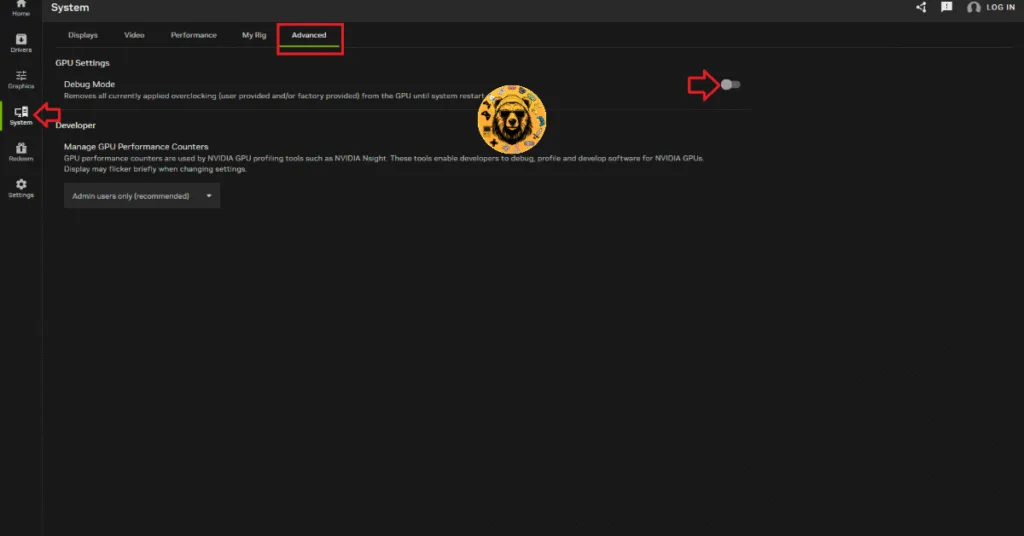
To fix these crashes, you have to force your graphics card to use its recommended settings. For NVIDIA graphics cards, you can do it through the Debug Mode.
- Open the NVIDIA App, and go to the “System” tab.
- Go to the “Advanced” tab.
- Turn on the Debug Mode.
- Continue playing Yakuza Kiwami 3, and the in-game crash issue is fixed.
There you have it, our Yakuza Kiwami 3 fixes for the random gameplay crashes on your PC. If you are facing errors and issues while playing other games on PC and handhelds, head to our hub of commonly occurring PC errors and their fixes.