
Yakuza series is seeing a steady growth in popularity ever since it Yakuza 0 released in 2017. Now, Yakuza Kiwami 3 remake has released on PC along with its Dark Ties expansion. However, it isn’t a perfect game as PC uers are experiencing random crashes. If you are looking for where the save files are stored for the game on PC and Steam Deck, you’ve come to the right place. The following is the save file location for Yakuza Kiwami 3 on PC and Steam Deck.
Yakuza Kiwami 3 Save File Location on Steam Deck, Linux, and Windows
| Client | Save File Location |
|---|---|
| Steam (Windows) | C:\Users\your username*\AppData\Roaming\Sega\YakuzaKiwami3\Steam\your Steam User ID**\ |
| Steam (Linux) | [SteamLibrary-folder]/steamapps/compatdata/3937550***/pfx/ |
| Steam Deck | /home/deck/.local/share/Steam/steamapps/compatdata/3937550***/pfx/ |
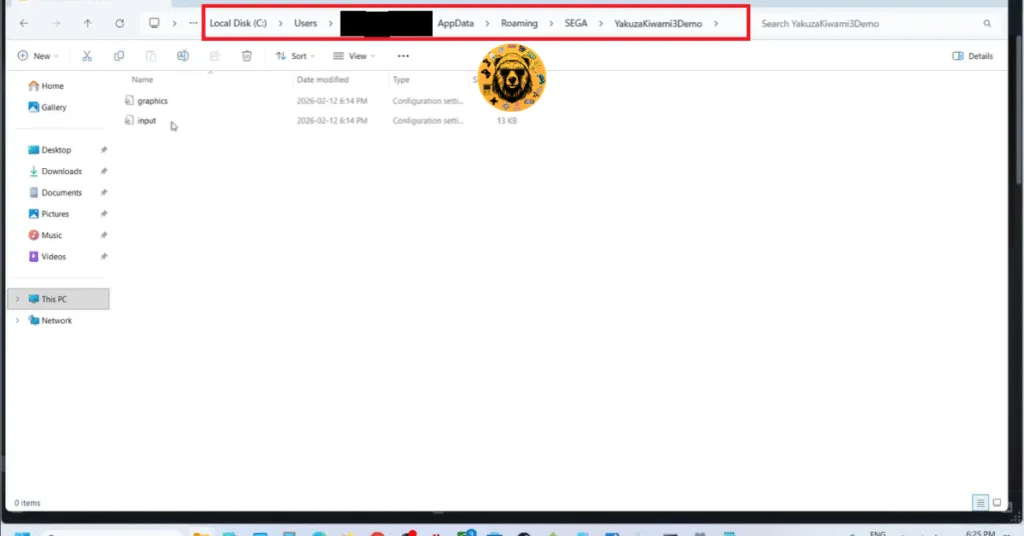
Windows users can alternatively paste the following address in the Windows Explorer address bar or Windows Run (Win + R) and press Enter to directly get to the saves folder for Yakuza 3 remake.
%APPDATA%\Sega\YakuzaKiwami3\Steam\your Steam userID\
*Replace the “your username” in the save location path with your Windows PC username.
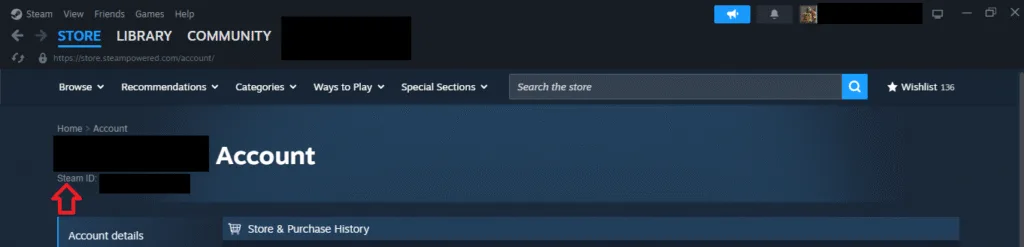
** Steam User ID is a 17 number unique identifier for your Steam account. Open Steam, click your profile name at the top right, select “Account details” option, your Steam ID will be under your username.
***Steam app ID is unique to every PC and Steam Deck. To find the App ID, right-click Yakuza Kiwami 3 in your Steam library > properties > Updates. The App ID will be listed here.
Save Location for Yakuza 3 Remastered
If you are playing the old remastered version of Yakuza 3, then the save location on your PC will be different.
C:\Program Files (x86)\Steam\userdata\your Steam User ID\1088710\remote
If you have installed Steam in another drive, then open the Steam folder from that drive and follow the path mentioned aboe to locate save files. The above path is only valid if you use the default instalaltion folder for Steam.
Also, if you are playing Yakuza 3 remastered through GOG, then the following will the save location:
C:\Users\your username\AppData\Local\GOG.com\Galaxy\Applications\56296605655234780\Storage\Shared\Files
That is all for our Yakuza Kiwami 3 & Dark Ties guide on where the saves are stored on your PC and Steam Deck.